Qubere Shipment Management
One shipment record, every fact, table, and agent run in one place.
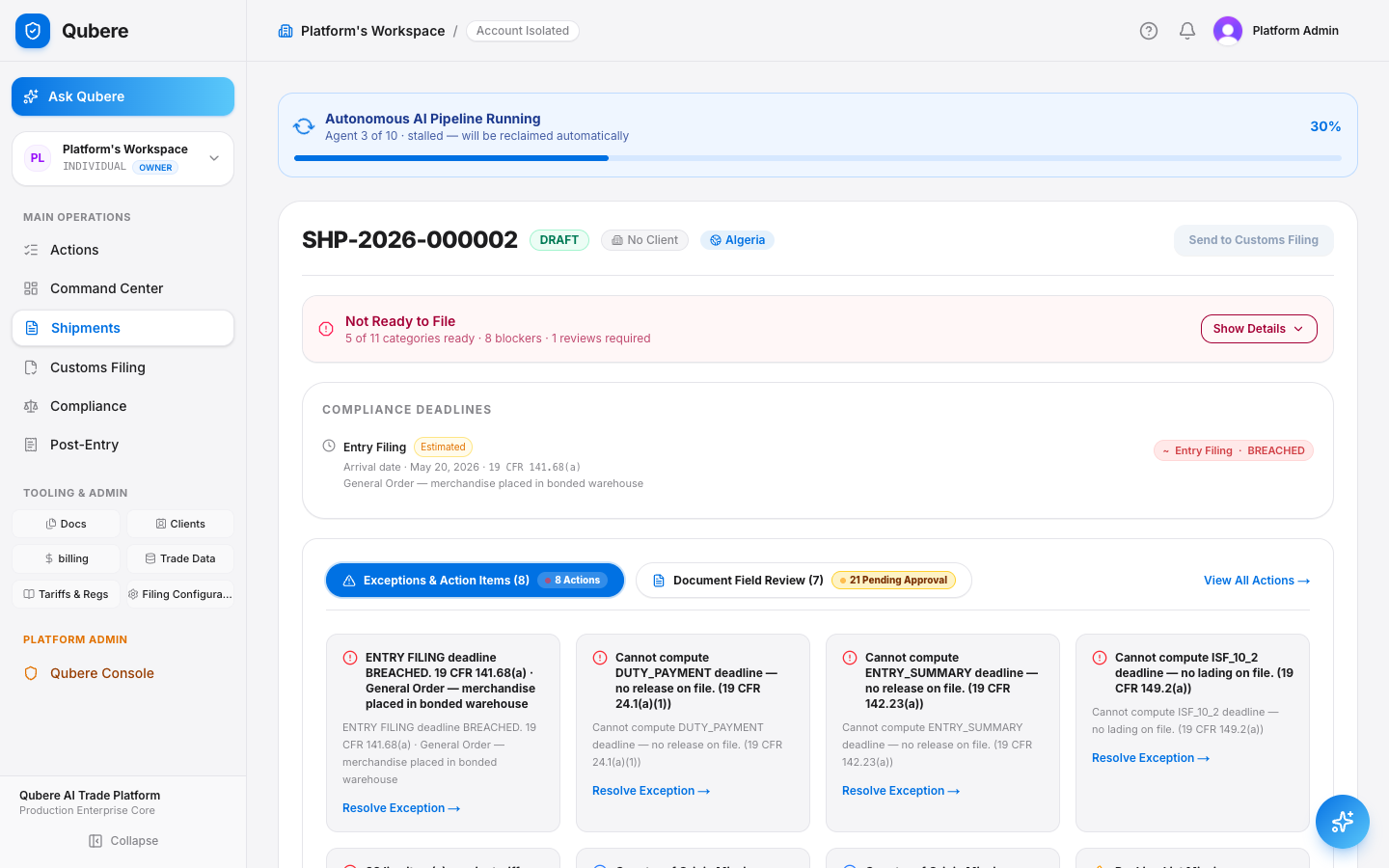
From creation to filing, the shipment detail page is the single system of record — canonical facts, containers/packages/line items, exceptions, PGA holds, screening, documents, tracking, and the full agent execution history, all reading and writing the same rows the rest of the app relies on.
The problem
Every shipment's facts, docs, and exceptions end up scattered across email, spreadsheets, and a dozen browser tabs.
What an ops manager says about managing shipments today:
"I have five tools open just to know what's still missing on one shipment."
No single record
"Nobody can tell me why a shipment is on hold without pinging three people."
No visible exception or audit history
"I don't know if the AI actually ran on this shipment or if someone just fixed it manually."
No agent execution visibility
How Qubere addresses it
One shipment page. Every panel reads and writes the same record.
- Canonical facts, containers, packages, and line items are the actual extraction/entry data — not a summary copied from somewhere else.
- Exceptions, PGA holds, and party-screening panels are scoped views over the same shared models used elsewhere in the app — not shipment-specific duplicates.
- A pipeline progress tracker and agent execution timeline show exactly which agent ran, when, and what it changed — built off real AgentExecutionRecord/PipelineJob rows.
- An append-style audit trail ties field approvals, document ingestion, agent runs, and exception resolutions to one chronological record.
The shipment workbench
Search, filter, and triage the whole book without opening a single shipment.
Global search across shipment number and importer name, column filters for status/client/owner, a live countdown on ISF and Entry Filing deadlines, and KPI tiles computed from the same filtered rows — Total, In Progress, Ready to File, Exception Hold.
- An enterprise-admin assignee/team picker (the old "Available from TMS" tab is no longer shown)
- Inline broker reassignment per row — no bulk multi-select today, one row at a time
- A Local Reference Number column shows the most recent filing's reference (defaults to the entry number, overridable) — the filing ID attached to each shipment, without opening it; filing numbers and statuses link straight to the filing
Canonical facts & cargo detail
The record CBP would see, not a summary of it.
The canonical facts panel is sourced from the same CanonicalShipmentService state the filing agents read. Containers, packages, and line items render as real, editable tables built from the shipment's actual extraction and entry data — the same rows the classification and duty-engine agents work from.
- Client and title editors write directly to the shipment record via PATCH — no separate "ops notes" field that goes stale
- Creation starts lean — importer, destination country, entry type — and logistics/PO/port detail populate as documents are ingested, not typed in twice
- A merged upload flagged as multi-document splits into additive child documents on human confirmation, each re-entering the standard parser pipeline
- Line items can be grouped by HTS code on demand — quantities, values, and weights consolidated per code, with mixed units of measure flagged rather than silently summed
- Vessel name and voyage number, captured from carrier documents, are materialized on the shipment record and flow into ISF filings as reference data (not transmitted to CBP as a standalone field)
| Line item | HTS | Qty | Value |
|---|---|---|---|
| Cotton knit top | 6109.10.0012 | 4,800 | $18,220 |
| Steel fasteners | 7318.15.2000 | 62,000 | $9,140 |
Pipeline progress & agent execution
See which agent ran, when, and what it decided — not just a spinner.
A live pipeline tracker polls run status every 3 seconds with a retry action. The agent execution timeline is built from real AgentExecutionRecord/PipelineJob rows — Document Intake, Document Intelligence, Product Intelligence, HTS Classification, Origin Rules, Valuation & Assists, Compliance Audit, and Filing Readiness.
- Customs Filing is deliberately excluded from every auto-triggered pipeline step — it simulates a CBP transmission and is always a manual, explicit action, never an automatic one
- A live stage stepper sits right on the workspace page, showing real-time progress through the shipment's work-management stages — complete, active, gate-pending, or blocked — with drill-in history and open exceptions per stage
Exceptions & PGA holds
Know exactly why a shipment is stuck — and who or what put it there.
The exceptions drawer reads the same ExceptionItem rows used across the app, layered with computed missing-document and reconciliation-conflict cards. PGA holds are kept strictly separate from screening warnings — only an actually-recorded agency hold shows here.
- Every exception traces to a real cause: a missing document type, a reconciliation conflict, or an agency hold — never an unexplained flag
Party screening, embargo checks & documents
The same screening and document engine everywhere — just filtered to this shipment.
The party-screening panel reads the same restricted-party disposition model used across the compliance module, gated by compliance.restrictedParty.read. The shipment's Parties panel shows each role's Party Master link and latest screening status, read-only — review stays in Compliance Workbench. Embargo and PGA checks no longer have a card on the shipment page; they live on the Customs Filing page, reading the same shared embargo model. The document workspace is the same document components used in Document Management, scoped here.
- Nothing shipment-specific is re-implemented here — every panel is a scoped view over a shared engine, so a fix in one place fixes it everywhere
| Document | Type | Status |
|---|---|---|
| INV-2026-4471.pdf | Commercial Invoice | accepted |
| PL-2026-4471.pdf | Packing List | accepted |
Tracking & audit trail
Every carrier event and every human action, on one timeline.
The tracking panel is a real webhook/event-driven projection — connection state shows as Connected, Waiting, Stale, or Not Configured depending on whether a carrier feed is actually wired up for that leg, never faked as live when it isn't. The audit trail ties field approvals, document ingestion, agent runs, and exception resolutions into one chronological record.
- Distinct from the leg-by-leg journey ribbon in Multi-leg Shipments — this is carrier/webhook event tracking, not route inference from paperwork
Objection handling
Every hard question, answered directly.
| "Is the tracking panel live carrier tracking for every shipment?" | It's a real webhook/event-driven projection, but connection state is shown honestly — Connected, Waiting, Stale, or Not Configured — depending on whether a carrier feed is actually wired for that leg. It never displays a fake "live" state. |
| "Does the agent timeline mean Customs Filing runs automatically too?" | No. Customs Filing is deliberately excluded from every auto-triggered pipeline path because it simulates an actual CBP transmission — it's always a manual, explicit action, never automatic. |
| "Can I bulk-update shipments from the workbench?" | Today the workbench supports inline broker reassignment one row at a time; there's no multi-select bulk-action toolbar yet. |
The close
One record. Every fact, every agent run, every reason it's stuck — in one place.
No spreadsheets, no separate ops log, no guessing why something's on hold — because every panel on the page reads the same shipment the rest of the app relies on.
Next step: open a shipment with an open exception, and walk the audit trail back to the exact document or agent run that caused it.