← All decks
Qubere

First Appointment — Confidential

The First Agentic
Customs Broker

Enterprise AI that turns shipping documents into evidence-backed, review-ready import decisions — autonomously.

99.8%
Extraction Accuracy
Tracked from every review verdict, by parser version
90%
Backlog Reduction
100%
Reasonable Care Defense
98%+
Customer Retention

The Problem

Customs compliance hasn't caught up
to the speed of global trade.

⚠️
Manual Classification Risk
HTS codes assigned by gut feel, not evidence. Every wrong classification is a penalty waiting to happen under 19 U.S.C. § 1484.
$40M+
avg annual penalty exposure per mid-size importer
⏱️
Clearance Backlogs
Brokers manually parse hundreds of pages per entry. Delays ripple into detention fees, missed ETA commitments, and supply chain disruption.
3–5 days
average manual clearance cycle per entry
💸
Duty Overpayments & Lost Drawbacks
Most importers overpay duties on misclassified goods and never file for refunds they're owed. The money simply disappears.
Millions
in unclaimed duty drawbacks per year, industry-wide

How It Works

6-Layer Agentic Architecture

Every decision is made by specialized agents, verified by evidence, and governed by human oversight.

L1 📄
Document Intelligence Agent
Ingests and extracts structured data from any trade document — commercial invoices, B/Ls, packing lists — at 99.8% accuracy.
Ingestion Layer
L2 🔍
Product Intelligence Agent
Classifies every product with HTS codes anchored to document coordinates and regulatory citations — not guesswork.
Classification Layer
L3 🛡️
Compliance & Screening Agent
Real-time screening against OFAC, denied parties, AD/CVD orders, and import restrictions — every party, every shipment.
Compliance Layer
L4 ⚖️
Decision Engine
Assembles evidence chains and proposes approve/reject decisions with confidence scores — each linked to source documents.
Decision Layer
L5 🧑‍⚖️
Human Review Workbench
Licensed brokers review only what AI flags. Every exception, every blocked item surfaced in a single prioritized queue.
Governance Layer
L6 📡
ABI Filing & Post-Entry Audit Agent
Automated ACE/ABI submission, continuous post-filing monitoring, and duty recovery — closing the loop end-to-end.
Filing & Recovery

The Platform

Everything a modern customs operation needs.

A single workspace — from document intake to duty recovery — designed for licensed brokers and enterprise importers.

⊞
Command Center
Real-time ops dashboard: value at risk, overdue filings, AI throughput
≡
Actions Queue
AI-triaged work list: blocked, needs review, and verified items across all shipments
📦
Shipment Workbench
Full shipment lifecycle management from intake to ACE clearance
📋
Customs Filing
Automated ABI filing, response center, and CBP entry status tracking
⚖️
Compliance Monitor
Continuous post-filing audit with Critical / High / Medium severity findings
🌐
Regulatory Intel
Live CBP & trade policy feed with per-product impact analysis
📊
Tariff Simulator
Model landed cost scenarios, source-shift breakeven, and duty stack delta
💰
Duty Drawback Recovery
Automated Section 301 refunds, drawback matching, and recovery tracking
📄
Trade Documents
Centralized document vault with AI extraction status and shipment linking
◇
Product Master
Item master with per-jurisdiction HTS classification and evidence history
⊞
Party Master
Supplier/importer identities with screening status and revalidation tracking
✨
Ask Qubere (AI Chat)
Natural language interface: query risk, create shipments, pull reports — conversationally
⛓
Multi-leg Shipments
One leg model shared by customs & freight, per-leg document checklists, and rule-based route inference

Command Center

Your entire operation, visible at a glance.

The real-time dashboard shows everything that needs attention — value at risk, overdue filings, AI throughput, and clearance pipeline — without clicking into a single shipment.

  • Live value-at-risk counter across all active shipments
  • AI Throughput bar shows auto-certified vs. human-touched rate
  • One-click drill-down from any KPI to the relevant shipment list
  • Overdue ETA flags surface before detention fees accrue
Demo Tip
Navigate to Command Center in the sidebar. Point to the AI Throughput bar — highlight the auto-certified vs. human-reviewed ratio. Ask: "How much of this would your team handle manually today?"
Platform's Workspace/Account Isolated
🔔
PA
Platform Admin
Value at Risk 🔔
199,949
7 not ready
Overdue ⏱
5
Past ETA, not filed
Needs Action ⚠️
5
Active Filings 📋
2
Ready to File ✓
0
Completed 📈
0
AI Throughput Auto-certified: 3 Human reviewed: 30 Touch rate: 91%
Recent Customs Shipments
Active Customs Filings & Pipeline
ShipmentClientExceptionsAI StatusReadinessETAStatus
SHP-2026-000007
ABC Mfg India
—189 blocked 13 review
28%
May 19 ⚠Draft
SHP-2026-000001
ABC Mfg India
——8 review
85%
—In Progress
SHP-2026-000002
ABC Mfg India
—55 blocked
15%
—Draft

Actions Queue

AI does the triage. Humans make the call.

Every decision that needs a human is surfaced here — grouped by shipment, triaged by severity, and preloaded with everything the reviewer needs to approve or reject in seconds.

  • Blocked, Needs Review, and Verified buckets updated in real time
  • Each item shows source document, AI reasoning, and confidence score
  • One-click Approve / Reject / Re-evaluate — with note capture
  • 189 open items across 5 shipments visible in a single queue
Demo Tip
Navigate to Actions. Click into SHP-2026-000001. Show the AI REVIEW panel — point to the "0% confident" chip and explain that the AI is asking for human override, not guessing. Hit Approve to show the one-click workflow.
Platform's Workspace/Account Isolated
🔔
PA
Platform Admin
⚠️Actions
189 open items across 5 shipments
SHIPMENTS (5)
AllCriticalHigh
SHP-2026-000001
Critical
⚖ 20 decisions · ⚠ 2 exceptions
SHP-2026-000002
Critical
⚖ 7 decisions · ⚠ 5 exceptions
SHP-2026-000007
Entry Filing · BREACHED
⚖ 25 decisions · ⚠ 20 exceptions
SHP-2026-000004
High
⚖ 74 decisions · ⚠ 5 exceptions
SHP-2026-000001 Critical
18 open actions · 4 verified
⚖ AI Review
10
Blocked
8
Needs Review
4
Verified
Blocked 10
📄 BookingRequest 1.pdf · Product Classification
Product Intelligence Gating: Missing valid product description. Pipeline paused.
0% confident
Approve Reject Re-evaluate + Note

Shipment Workbench

Every shipment. Every status. One screen.

The Shipment Workbench is the central hub for managing the customs lifecycle — from document upload to ACE submission. Each entry shows real-time readiness, AI status, and filing health in one row.

  • Health score (HEALTHY / AT-RISK) calculated from all compliance checks
  • Exception & Action Item panels inside each shipment detail view
  • Compliance deadlines computed from lading, arrival, and release dates
  • One-button "Send to Customs Filing" when cleared
  • Multi-leg journey ribbon: per-leg status, per-leg documents, route inferred from the paperwork — and the customs rail never lets "arrived at port" masquerade as "cleared"
Demo Tip
Open Shipments → SHP-2026-000001. Show the health score (85% HEALTHY) and the readiness gate. Click Show Details to reveal the 11 compliance categories. Point to the Packing List Missing exception — note the AI prompt to request it from the counterparty.
Platform's Workspace/Account Isolated
🔔
PA
Platform Admin
SHP-2026-000001
In Progress
HEALTHY
85%
⚠Not Ready to File3 of 11 categories ready · 1 blocker · 1 review required
⚠Packing List Missing
Required for customs entry filing. Upload the Packing List to clear this requirement.

Customs Filing

ABI filing, automated. CBP responses, centralized.

Qubere submits entries to ACE/ABI automatically once a shipment clears its readiness gate. Every CBP response, query, and status update flows back into the same workspace — no portal-hopping.

  • Automated ABI submission for Type 01, 03, 11, and ISF filings
  • Entry status (Accepted, In-Review, Query) visible without logging into ACE
  • CBP queries routed as action items for broker response
  • Full filing history with importer, value, and date logged
Demo Tip
Navigate to Customs Filing. Show the entry QBR-2026-3231761 with ACCEPTED status. Point out that this was filed ABI-Automated — no manual ACE login required. Ask: "How long does your team spend inside ACE per entry today?"
Platform's Workspace/Account Isolated
PA
Platform Admin
Entry Number Importer Country Filing Type Status Total Value Filed Date Last Updated Actions
QBR-2026-3231761 ABC Manufacturing India Pvt Ltd Not provided ABI – Automated ACCEPTED $688.80 Aug 7, 2026 Aug 7, 2026
Showing 1–1 of 1
Page 1 of 1
What gets filed automatically?
✓ Type 01 Formal Entry ✓ Type 03 Informal Entry ✓ ISF 10+2 ✓ CBP 3461 / 7501

Compliance Monitoring

Continuous post-filing audit. Audit-proof defense.

After every entry is filed, Qubere keeps watching. The Compliance Monitor runs continuous checks against the compliance checklist and surfaces findings by severity — so issues are caught before CBP does.

  • Critical / High / Medium / Low severity findings tracked live
  • Run on-demand audits or let continuous monitoring catch drift
  • Export compliance records as audit-ready documentation
  • Directly satisfies 19 U.S.C. § 1484 Reasonable Care standard
Demo Tip
Navigate to Compliance. Hit Run Compliance Audit and describe what happens: all active filings are checked against the compliance ruleset in real time. Mention the Export Compliance Record button — this is the importer's Reasonable Care documentation if CBP ever asks.
Platform's Workspace/Account Isolated
🔔
PA
Platform Admin
0
Critical
0
High
0
Medium
0
Low
✓ No critical or high findings open
✓
No open compliance findings
Run a compliance audit to check all active filings against the compliance checklist.
19 U.S.C. § 1484 Reasonable Care
Every audit run is timestamped and exportable as evidence of importer due diligence. This is your compliance defense on record.

Regulatory Intelligence

CBP policy changes, assessed before they hit your shipments.

The Regulatory Intel feed pulls live CBP and trade policy updates and lets you assess their impact on your specific product catalog — instantly. No more reading Federal Register PDFs manually.

  • Live feed: tariff adjustments, import restrictions, AD/CVD orders
  • Assess Impact runs against your product and HTS portfolio
  • Action Required flags alert your team to items needing a response
  • Landed cost scenario comparisons built in for tariff changes
Demo Tip
Navigate to Regulatory Intel. Click Assess Impact on the Customs User Fees Adjusted for Inflation item. The right panel calculates how this affects your current product portfolio's duty burden. This is the kind of analysis that used to take a trade attorney a week.
Platform's Workspace
PA
Platform Admin
CBP & Trade Regulatory Updates Feed
Trade PolicyAction Required
Customs User Fees To Be Adjusted for Inflation in Fiscal Year 2027
CBP is adjusting customs user fees per COBRA FY2027 via the Fixing America's Surface Transportation Act...
Effective: 9/30/2026 · Doc: 2026-15530
Trade PolicyAction Required
Imposition of Import Restrictions on Archaeological Material of Nepal
CBP amends regulations reflecting import restrictions per bilateral agreement with Nepal on cultural property...
Effective: 8/1/2026 · Doc: 2026-14821
🌐
Impact Analysis Workspace
Select a regulatory update from the feed to compute product and shipment exposure.

Tariff & Sourcing Simulator

Model your duty exposure before you sign a PO.

The Tariff Simulator lets supply chain and finance teams model landed cost scenarios, compare sourcing alternatives, and compute duty stack breakevens — without waiting on a trade attorney or broker.

  • Create scenarios by origin country, HTS code, and cost components
  • China vs. Vietnam breakeven auto-calculated with duty differential
  • Multiple scenarios compared side by side in one view
  • Section 301 readiness inventory built in for affected HTS codes
Demo Tip
Navigate to Tariff Simulator. Show the pre-filled China scenario (HTS 8541.43.0010, 5,000 units). Scroll down to the China vs. Vietnam Breakeven Analysis. Ask: "What would your team charge you to get this analysis from a trade attorney?" — the answer is usually $2,000–$5,000 and 2 weeks.
Platform's Workspace
PA
Platform Admin
Create New Sourcing Scenario
Scenario Name
Origin Country
HTS Code
Landed Cost Components
Unit Cost ($)
Quantity
Freight ($)
Insurance ($)
Active Modeling Scenarios
No scenarios saved yet.
Create one to start comparing.
Alternative Sourcing Breakeven
📈
China vs Vietnam Breakeven Analysis
Alternative sourcing conditions...

Duty Drawback & Recovery

Get back the duties you've already paid.

Most importers are sitting on unclaimed duty refunds. Qubere's Recovery Center automatically identifies Section 301 exclusion opportunities, matches drawback inventory, and tracks every refund claim through to resolution.

  • One-click scan surfaces all confirmed refund opportunities
  • Drawback Matching & Claims tab links exports to original imports
  • Section 301 Readiness Inventory flags affected HTS codes in your catalog
  • Recovery tracked end-to-end — filed, pending, paid
Demo Tip
Navigate to Duty Drawbacks. Hit Scan for Refund Opportunities. Walk through the three tabs: Refund Opportunities, Drawback Matching, and Section 301 Readiness. The key message: "Every shipment you've filed is being checked for money you can recover. Most of your competitors aren't doing this."
Platform's Workspace
PA
Platform Admin
Refund Opportunities (0)
Drawback Matching & Claims
Section 301 Readiness Inventory
✓
Confirmed & High-Confidence Savings
No active recovery opportunities identified yet. Run a scan to check your filing history.
📋
Section 301 Exclusions
Retroactive refunds on tariff-excluded HTS codes from prior entries
🔄
Manufacturing Drawback
Match imported components to exported finished goods for duty recovery
📦
Unused Merchandise
Recover duties on imported goods returned or re-exported unused

Ask Qubere — AI Chat

Your entire trade operation, answerable in one question.

Ask Qubere is a natural language interface into your entire workspace. Query shipment risk, create entries, look up products, or find documents — the way you'd ask a colleague, not a search engine.

  • "What are my high-risk shipments?" → instant prioritized list
  • "What's the value at risk right now?" → live number with drill-down
  • "Create a shipment for ABC Manufacturing" → form pre-filled
  • Context-aware: understands your workspace, clients, and shipments
Demo Tip
Open Ask Qubere (the chat icon or the blue button in the sidebar). Type "What are my critical shipments?" — show the AI pulling live data. Then try "Who's on my team?". Emphasize: this isn't a chatbot over a FAQ, it's a live agent querying your actual data.
✦
☀ Light mode
⊞
≡
📄
📋
🌐
📦
⊞
Hi Platform 👋
Ask about shipments, docs, products, or create new ones.
What are my high risk shipments?  Tab to use
📎  Active workspace: Platform's Workspace
→
At-risk shipments Value at risk Who's on my team? Unassigned shipments Create a shipment
Try Asking
Shipments
› Which shipments are at risk?
› Which shipments are not assigned?
› Critical shipments for today?
› What is the $ amount at risk?
Catalog & Docs
› Search products for electronics
› Look up parties named ABC
› Find commercial invoices
Team & Create
› Who's on my team?
› Create a shipment
+ New chat

Why Qubere

Built for the age of agentic trade.

Manual Broker Legacy TMS Qubere
AI document extraction ✗ Partial ✓
Evidence-anchored HTS classification ✗ ✗ ✓
Automated ABI/ACE filing ✗ Partial ✓
Continuous post-filing compliance audit ✗ ✗ ✓
Live regulatory feed + impact analysis ✗ ✗ ✓
Tariff scenario modeling ✗ Partial ✓
Automated duty drawback recovery ✗ ✗ ✓

Proof Points

Numbers that matter to operations.

Qubere is measured by outcomes — not features.

99.8%
Document extraction accuracy across commercial invoices, B/Ls, and packing lists
90%
Reduction in manual clearance backlogs for enterprise brokerage operations
100%
19 U.S.C. § 1484 Reasonable Care compliance defense — every decision is documented
98%+
Customer retention among Fortune 500 importers and premier brokerages
6 layers
Agentic architecture spanning document ingestion through post-entry audit
$M+
In duty savings recovered for customers through automated drawback and exclusion programs

For the Sales Team

Demo Playbook

A 20-minute walkthrough that covers the full platform. Start at Command Center, end at AI Chat. Hit the key moments below. For EU-importing customers, CBAM Intelligence (Annual Declarations, certificate holding) is a separate module with its own deck; its Art 26 penalty base amount is not yet ingested and IEA-derived data awaits a licensing clearance.

1
Open with Command Center
Show the Value at Risk ($199,949) and AI Throughput bar (91% touch rate). Ask: "How do you know what's at risk right now without Qubere?"
Sidebar → Command Center
2
Show Actions Queue triage
Click SHP-2026-000001. Show the AI REVIEW panel: 10 Blocked, 8 Needs Review, 4 Verified. Hit Approve on one item — show the one-click workflow.
Sidebar → Actions → SHP-2026-000001
3
Drill into a Shipment
Open SHP-2026-000001. Show the 85% health score, the readiness gate (3 of 11 ready), and the Packing List Missing exception with the "Request from counterparty" button.
Shipments → SHP-2026-000001
4
Show the Filing — ACCEPTED
Navigate to Customs Filing. Show QBR-2026-3231761 as ACCEPTED. Point out ABI-Automated. Ask: "How long does your team spend in ACE per entry?" The answer is always painful.
Sidebar → Customs Filing
5
Regulatory Intel + Tariff Sim
Show the live CBP feed. Click Assess Impact. Then jump to Tariff Simulator — show the China vs. Vietnam breakeven. Ask: "What does your trade attorney charge for this analysis?"
Regulatory Intel → Tariff Simulator
6
Close with Ask Qubere
Open the AI Chat. Type "What are my critical shipments?" live. Then "Create a shipment." End with: "This is what it looks like when your entire customs operation is answerable in one question."
Blue button → Ask Qubere
Qubere

Ready to file your first entry?

Start with a single shipment. See the AI work. Experience what autonomous customs compliance actually feels like.

Enterprise Sales
sales@qubere.ai
Platform
qubere.ai
Onboarding
Same-week setup
Live product screenshot

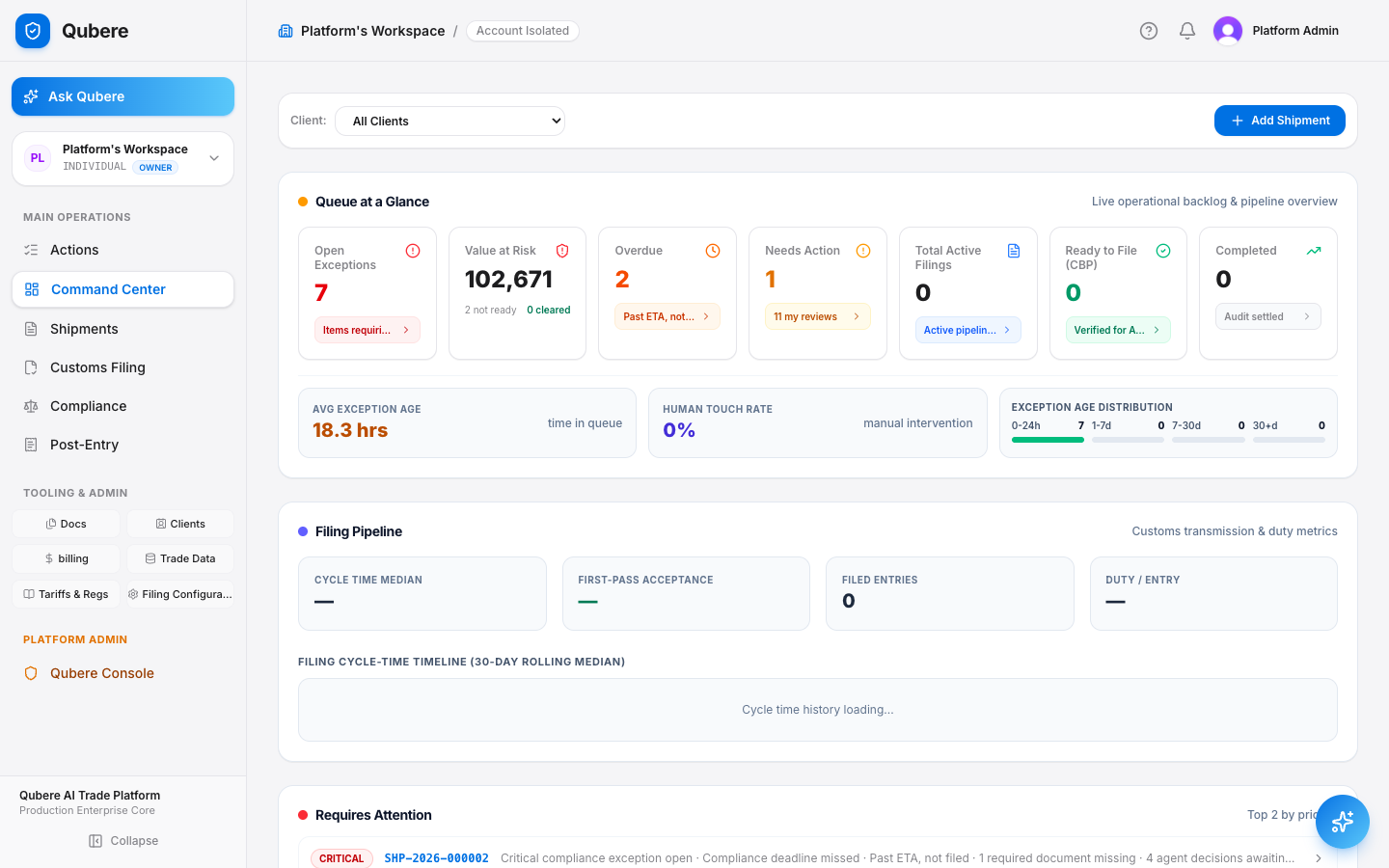
Command Center

See your entire book of business before you open a single shipment.

The dashboard aggregates every active shipment into one operational view — value at risk, overdue filings, exception age, and AI throughput — so ops leads triage by exception, not by clicking through every file.

Use Case A brokerage manager needs to know, at 8am, which of dozens of active shipments are about to miss a filing deadline — without opening each one individually.
  • Value-at-risk and overdue-filing counters update in real time across every shipment
  • AI Throughput bar shows what share of decisions were auto-certified vs. human-reviewed
  • Exception age distribution flags anything sitting untouched for days
  • “Requires Attention” panel ranks shipments by severity so nothing slips
How to on Qubere
Sidebar → Command Center. It's the default landing page after sign-in — no setup required.
Qubere Command Center dashboard showing live queue, filing pipeline, and shipments
Live product screenshot

Actions Queue

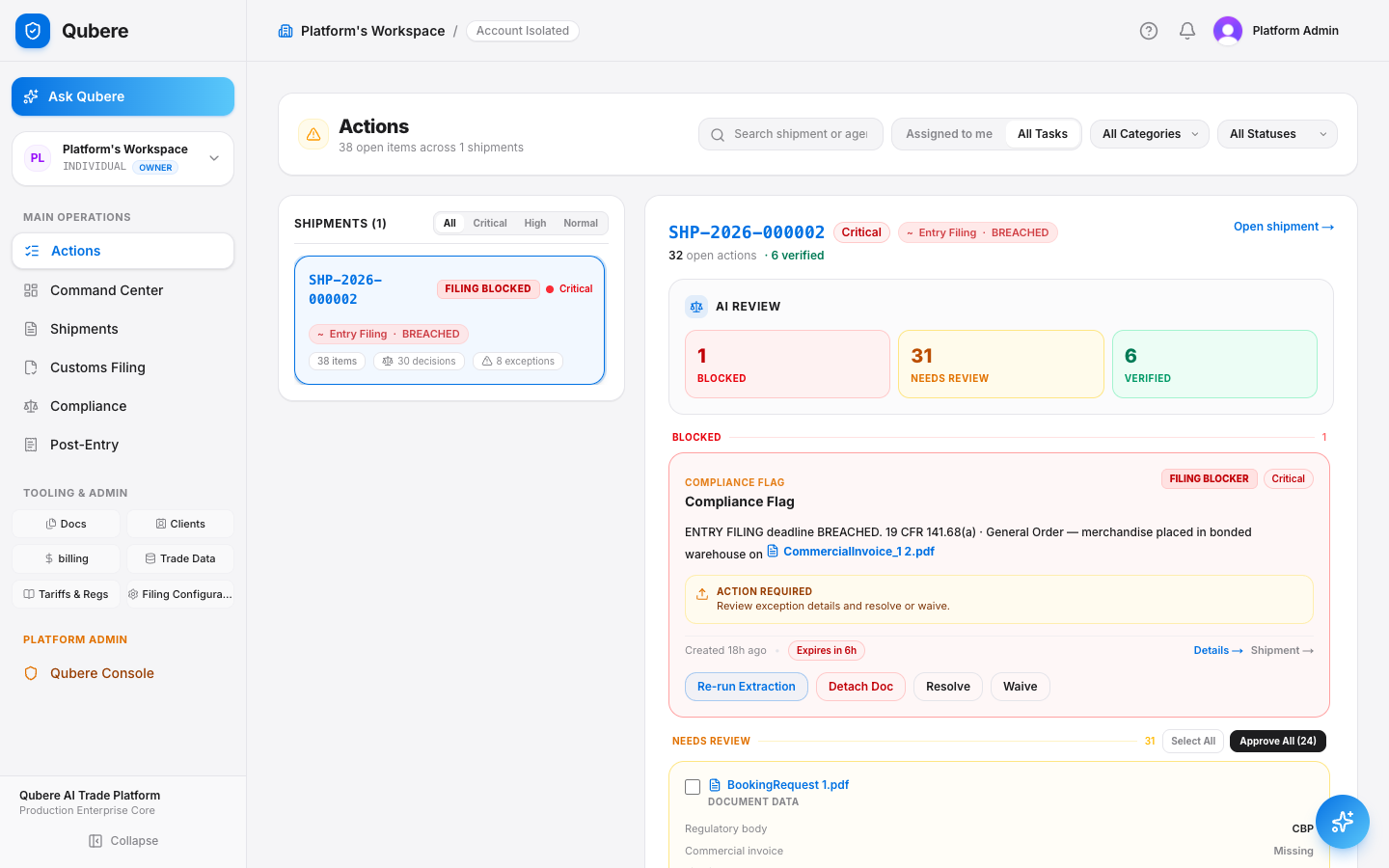
AI pre-triages every decision. Your team only touches what needs a human.

Every document field, HTS classification, and compliance flag the AI isn't fully confident in lands here — grouped by shipment, sorted Blocked / Needs Review / Verified, with the source document and confidence score attached.

Use Case A reviewer opens their queue and needs to know instantly which open items are filing-blocking versus routine sign-off, out of dozens.
  • Items are pre-sorted into Blocked, Needs Review, and Verified — no manual sifting
  • Each item shows the source PDF, extracted field, and AI confidence score inline
  • One-click Approve / Reject / Re-evaluate with an optional note, no context-switching
  • Compliance flags cite the actual regulation (e.g. 19 CFR 141.68(a)) next to the AI's reasoning
How to on Qubere
Sidebar → Actions. Select a shipment card to open its queue; use Approve All for routine batches or drill into individual items.
Qubere Actions queue showing AI review triage for a shipment
Live product screenshot

Shipment Workbench

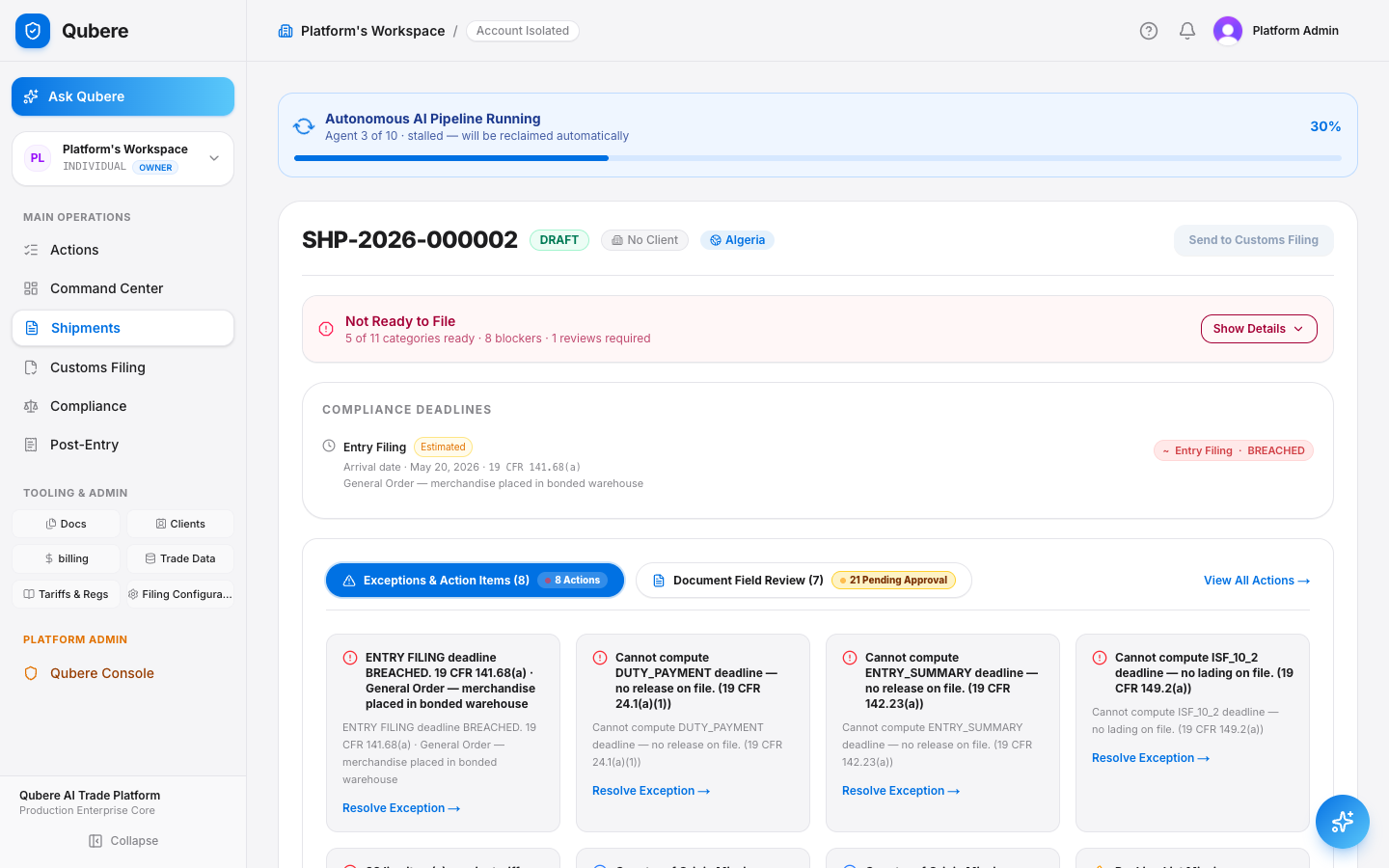
One screen for the full customs lifecycle — intake to ACE.

Every shipment carries a live readiness gate across compliance categories, its own exception list, and a document vault with AI-extracted line items — so nothing gets filed until it's actually ready.

Use Case A broker needs to know exactly why a shipment can't be filed yet, and what to do about it, without hunting through email threads.
  • Readiness gate shows “X of 11 categories ready” plus blocker and review counts
  • Missing-document exceptions come with a one-click ‘Request from counterparty’ action
  • Compliance deadlines (ISF, Entry Summary, Duty Payment) compute automatically once an anchor date is on file
  • Send to Customs Filing only unlocks once the readiness gate clears
How to on Qubere
Sidebar → Shipments → open any shipment. “Show Details” expands the full readiness checklist.
Qubere shipment detail view showing readiness gate and compliance exceptions
Live product screenshot

Trade Documents

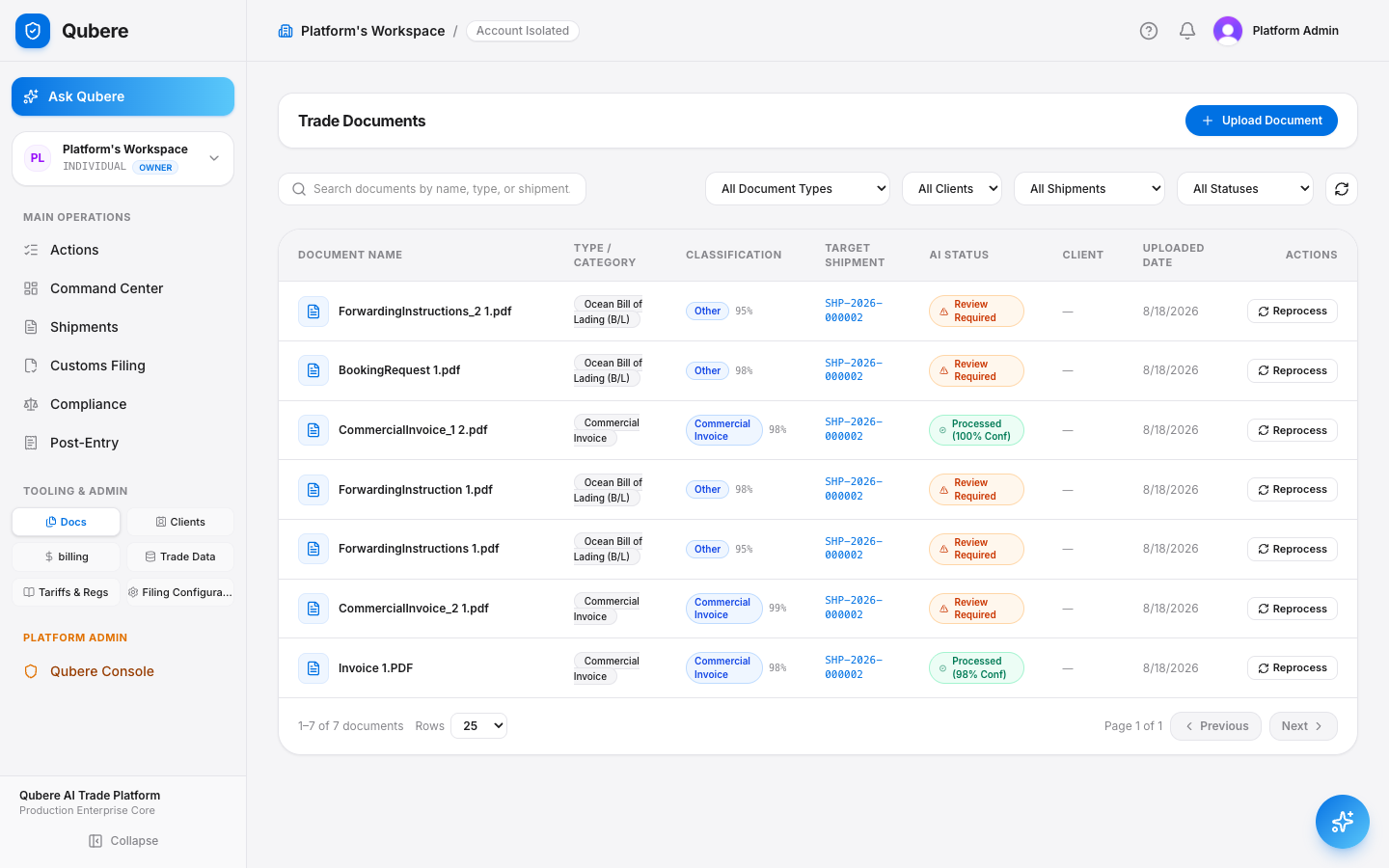
Every invoice, B/L, and packing list — extracted, classified, and vaulted automatically.

Upload any trade document and Qubere's vision extraction reads it, classifies the document type, and links it to the right shipment with a confidence score — no manual data entry.

Use Case A logistics coordinator receives a stack of PDFs from a freight forwarder in different formats and needs them turned into structured line-item data before end of day.
  • AI classifies document type (Commercial Invoice, B/L, Packing List, etc.) automatically on upload
  • Every document shows a parse confidence score and links to its target shipment
  • Filter the entire vault by type, client, shipment, or AI status in one search
  • Reprocess any document on demand if a revised version comes in
  • Qubere Magic Marker — fix a wrong field by dragging a box around the correct text on the page, no retyping
  • Qubere Learns — that correction is remembered per account/document type/field and applied automatically on the account's next extraction
How to on Qubere
Sidebar → Docs → Upload Document. Documents route themselves to the matching shipment once identified.
Qubere Trade Documents vault with AI extraction status per document
Live product screenshot

Customs Filing

ABI filing and CBP response tracking, without logging into ACE.

Once a shipment clears its readiness gate, Qubere prepares and tracks the ABI submission — entry number, filing type, and status — in the same workspace, end to end.

Use Case A broker needs to tell a client exactly where their entry stands — Draft, Transmitted, Accepted, or under CBP query — without switching to the ACE portal.
  • Every filing tracks Local Reference Number, Entry Number, filing type, and total value in one table
  • Status pipeline covers the full lifecycle: Draft → Preparing → Transmitted → Accepted / Rejected / Customs Hold
  • New Filing kicks off directly from a cleared shipment — no duplicate data entry
  • Full filing history stays searchable by importer, country, or entry number
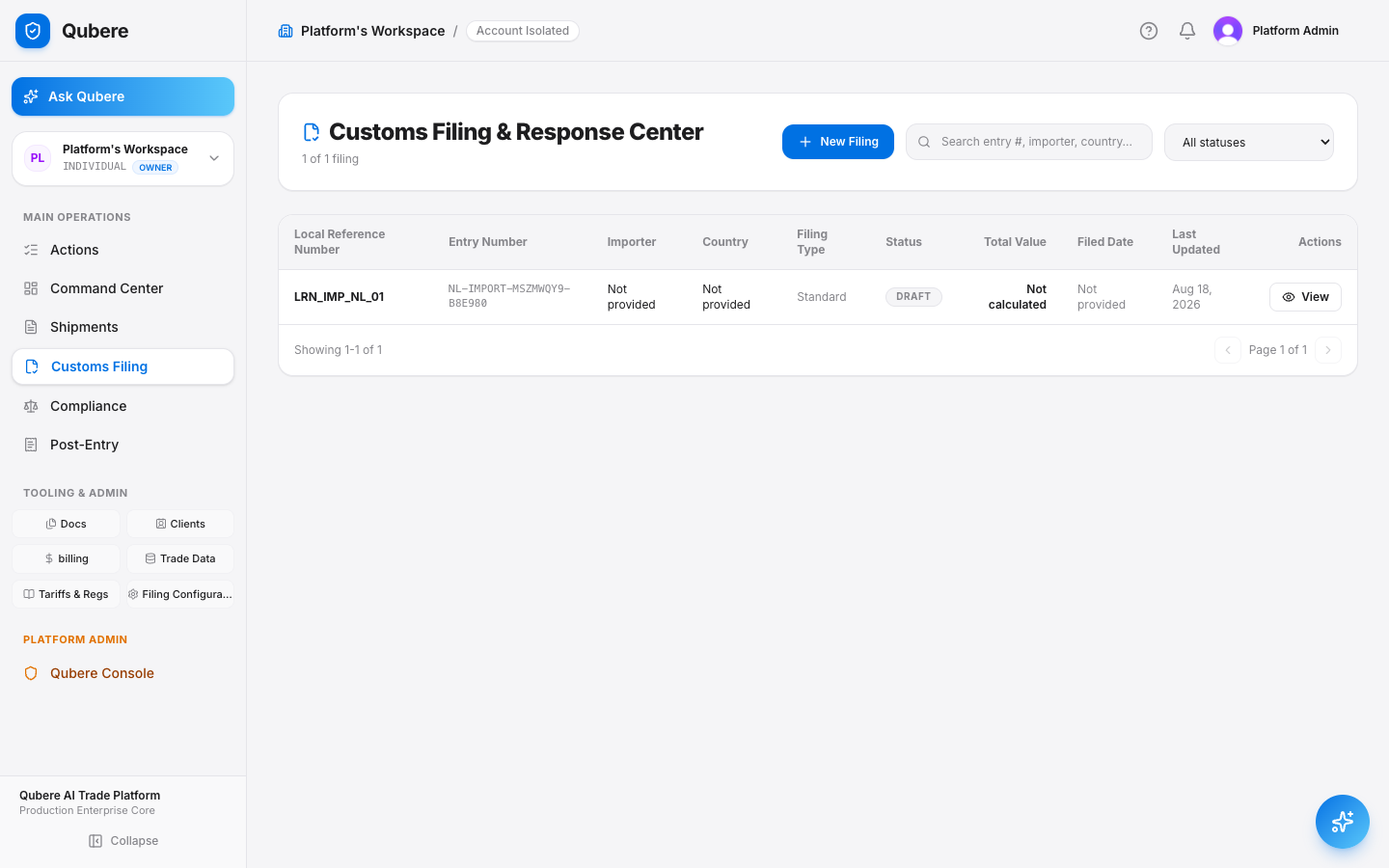
How to on Qubere
Sidebar → Customs Filing. Click New Filing to start one, or View on any row for full entry detail.
Qubere Customs Filing and Response Center showing entry status table
Live product screenshot

Compliance Monitor

Screening doesn't stop at filing — it runs continuously.

Country embargo, end-use, end-user, anti-boycott, and military end-use screening run against every shipment on an ongoing basis, with findings tracked by severity so nothing drifts unnoticed.

Use Case A compliance officer needs proof — not a guess — that every active filing has been screened against restricted-party and embargo lists this week, not just at intake.
  • Findings tracked live across Critical / High / Medium / Low severity
  • Five screening categories run per shipment: Country Embargo, End-Use, End-User, Anti-Boycott, Military End-Use
  • Review Queue isolates filing-level findings that still need a resolution
  • Every audit run is timestamped — the record itself is the Reasonable Care defense
  • Network & Ownership Intelligence traces a party's relationships — ownership, management, vessel identity — and auto-opens an Enhanced Due Diligence case for the highest-severity trigger it finds
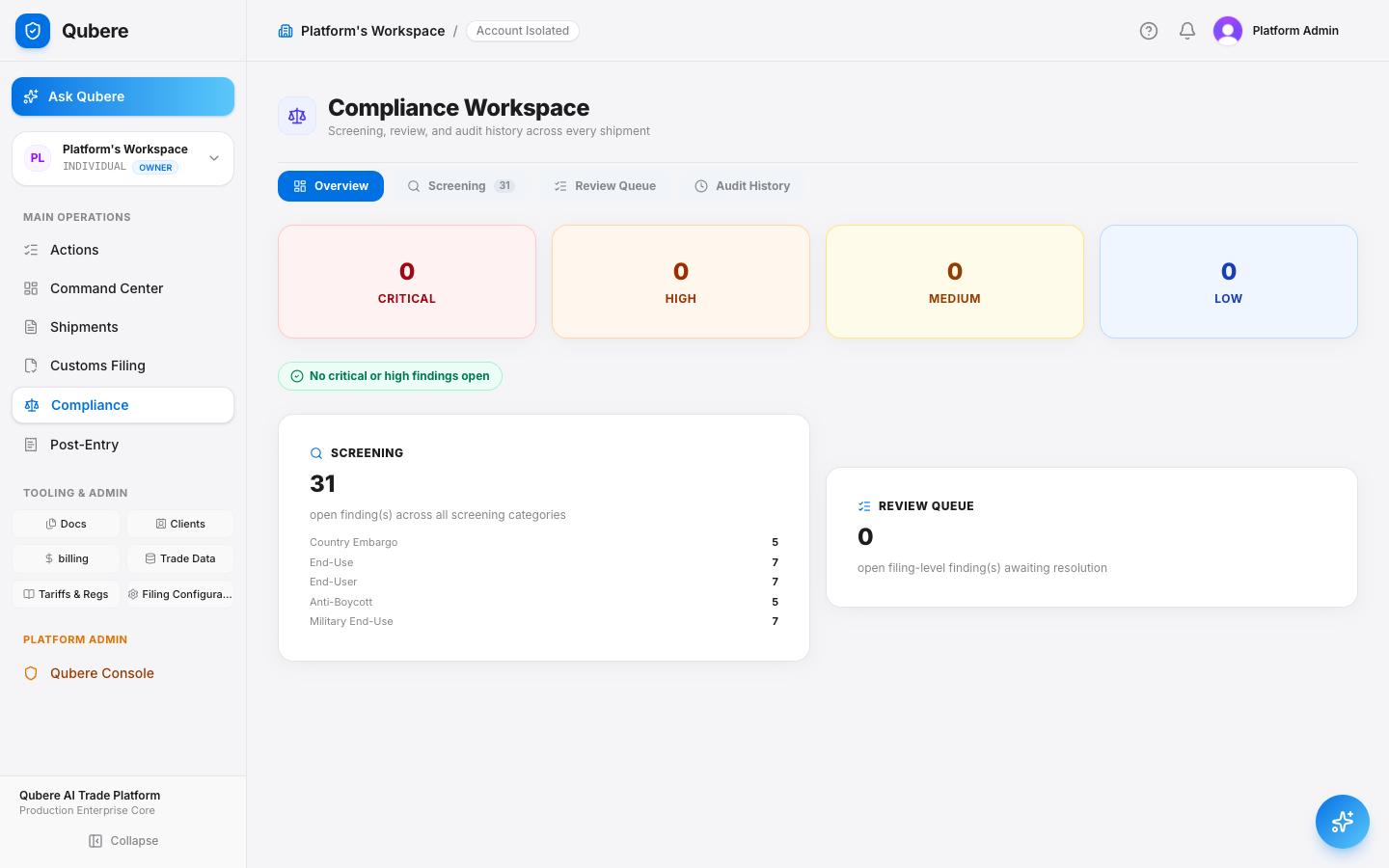
How to on Qubere
Sidebar → Compliance. The Screening tab breaks down open findings by category and severity.
Qubere Compliance Workspace showing screening findings by category
Live product screenshot

Post-Entry Management

Drawback, reconciliation, corrections, and protests — one hub, four statutory clocks.

After an entry files, the compliance work doesn't stop. Post-Entry brings duty drawback, ACE reconciliation, post-summary corrections, and Form 19 protests into a single workspace instead of four disconnected processes.

Use Case A finance/compliance team is tracking four different post-filing deadlines by hand — the 270-day PSC window, the 180-day protest window — and needs one place that owns all of it.
  • Duty Drawback: identify and quantify refund claims, track lot eligibility and export deadlines
  • ACE Reconciliation: surface discrepancies between entry summaries and source documents
  • Post-Summary Corrections: recalculate duties and manage ACE transmissions inside the 270-day window
  • Protests (Form 19): track deemed denials and CIT appeal deadlines under 19 U.S.C. § 1514
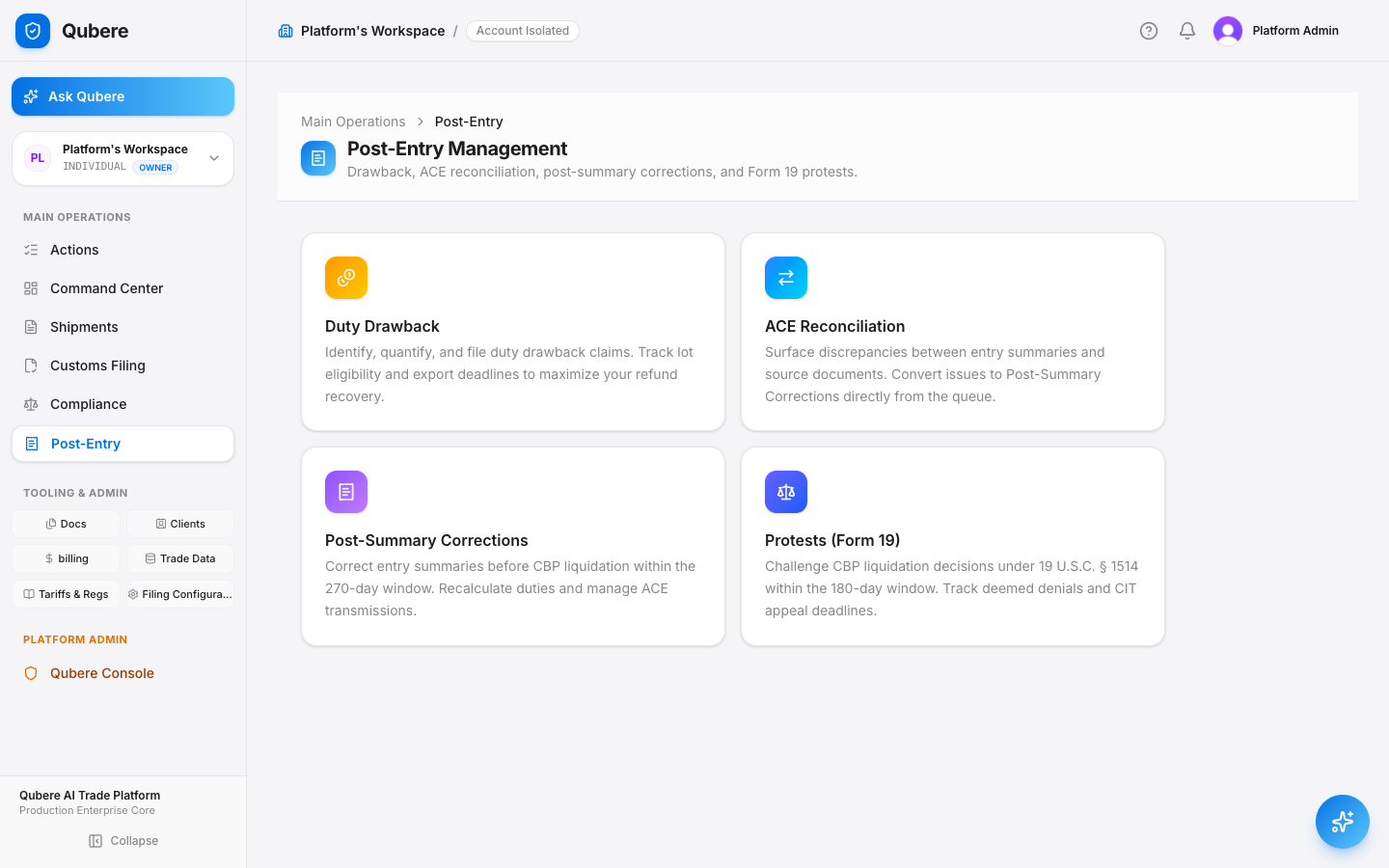
How to on Qubere
Sidebar → Post-Entry, then choose the workflow you need.
Qubere Post-Entry Management hub with four workflow cards
Live product screenshot

Duty Drawback & Recovery

Find the refund money sitting in filings you've already made.

One click scans filing history for Section 301 exclusion opportunities, matches drawback-eligible inventory, and tracks every recovery claim from identification to payment.

Use Case A CFO wants to know whether the company is leaving duty refunds unclaimed — money that's legally recoverable but requires someone to go looking for it.
  • Scan for Refund Opportunities checks filing history automatically — no manual review
  • Drawback Matching links exported goods back to the original import for manufacturing / unused-merchandise drawback
  • Section 301 Readiness Inventory flags every HTS code in the catalog that qualifies for exclusion refunds
  • Recovery tracked end-to-end: identified → filed → pending → paid
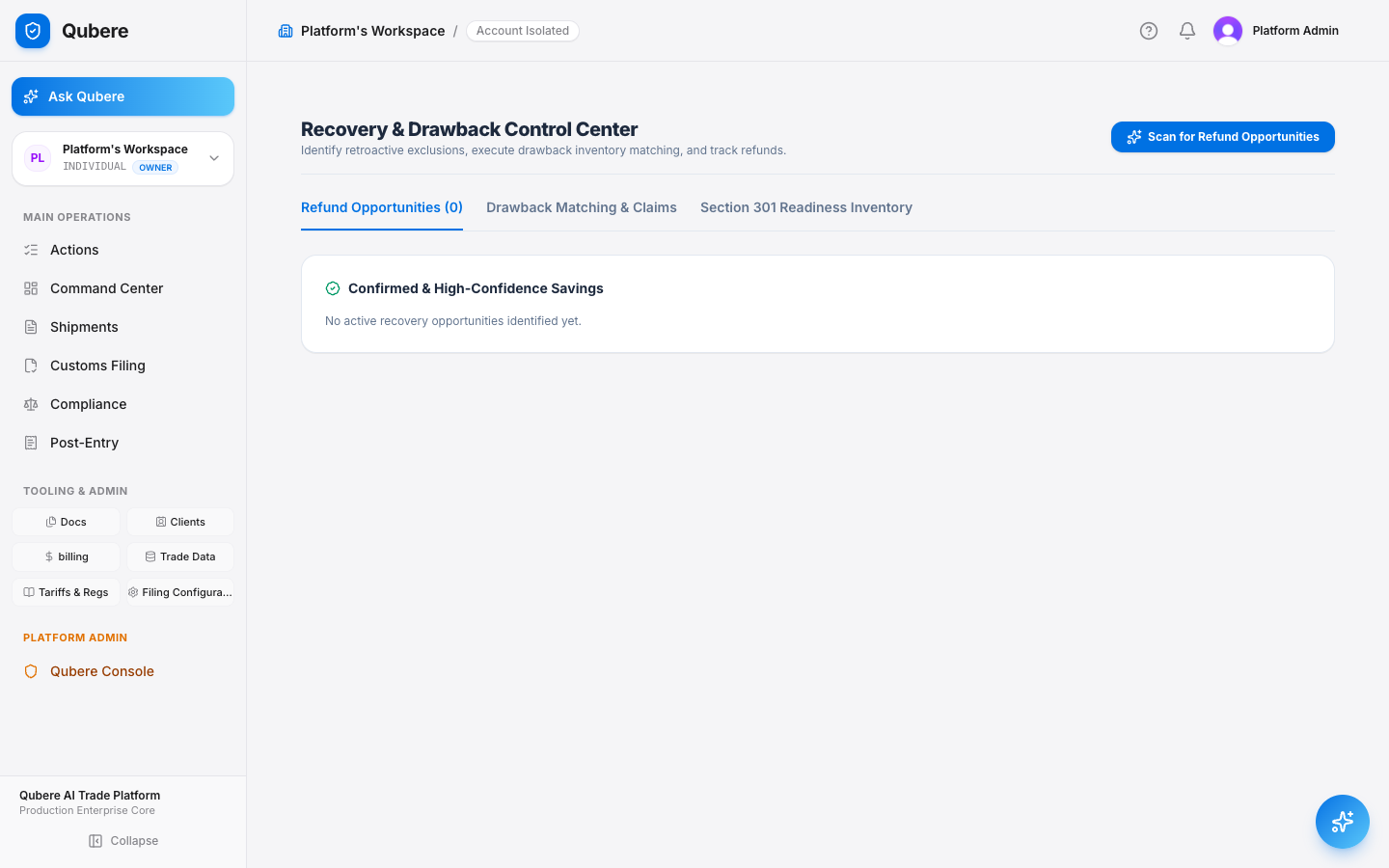
How to on Qubere
Sidebar → Post-Entry → Duty Drawback → Scan for Refund Opportunities.
Qubere Recovery and Drawback Control Center
Live product screenshot

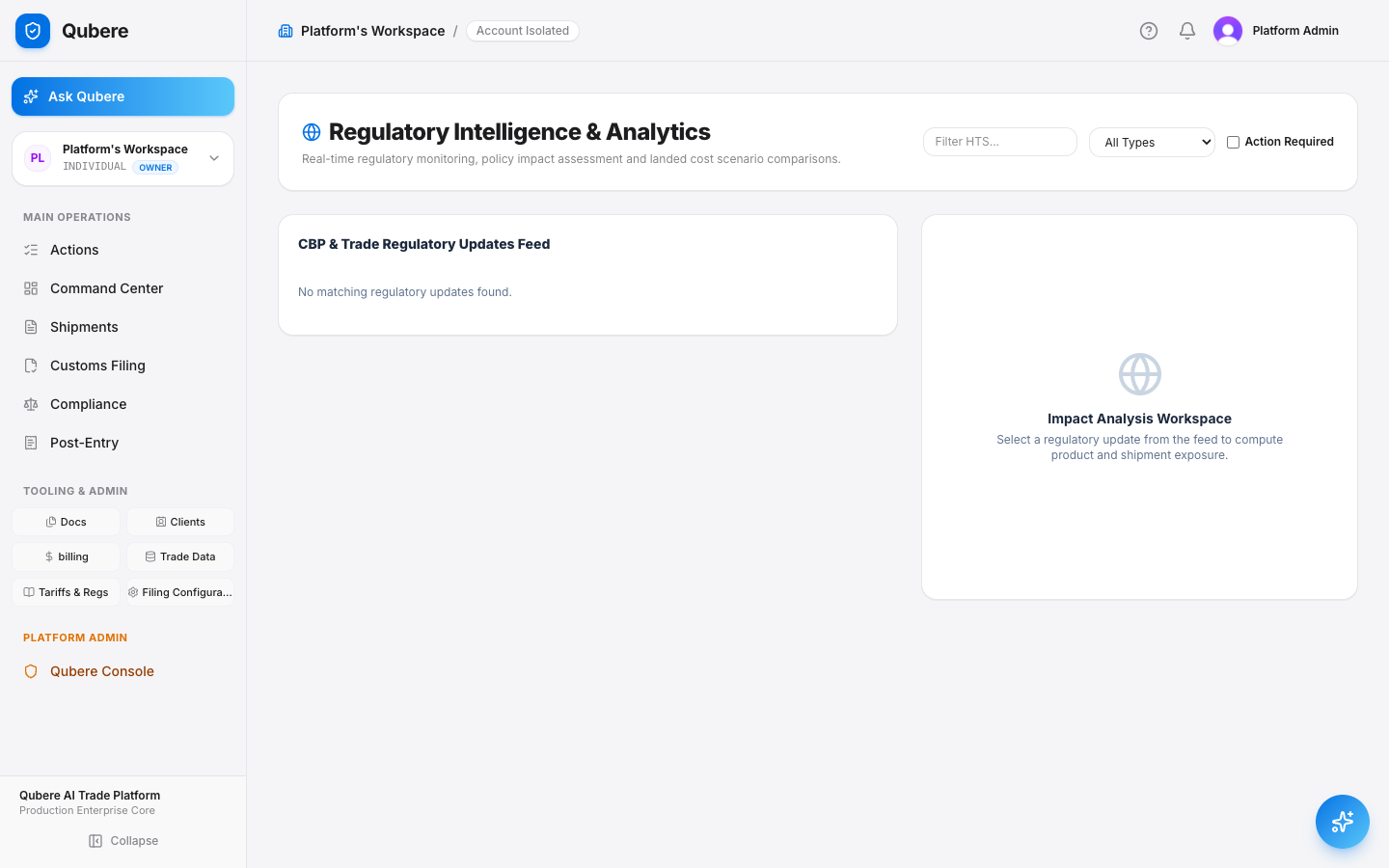
Regulatory Intelligence

Know about a CBP rule change before it hits your shipment — not after.

A live feed of Federal Register notices, AD/CVD orders, Section 301 actions, and trade-agreement changes, each with an AI-generated impact assessment against your actual product portfolio.

Use Case A trade compliance team currently finds out about tariff changes from a broker email or a Federal Register PDF someone happened to read — days after it took effect.
  • Live feed spans tariff changes, exclusions, policy updates, and AD/CVD actions
  • Filter by HTS code to see only what actually touches your catalog
  • Assess Impact runs the update against your product and shipment portfolio automatically
  • Action Required flags surface items your team hasn't responded to yet
How to on Qubere
Sidebar → Tariffs & Regs → Regulatory Updates. Click Assess Impact on any feed item.
Qubere Regulatory Intelligence and Analytics feed
Live product screenshot

Tariff & Sourcing Simulator

Model the duty stack before you sign the PO — not after.

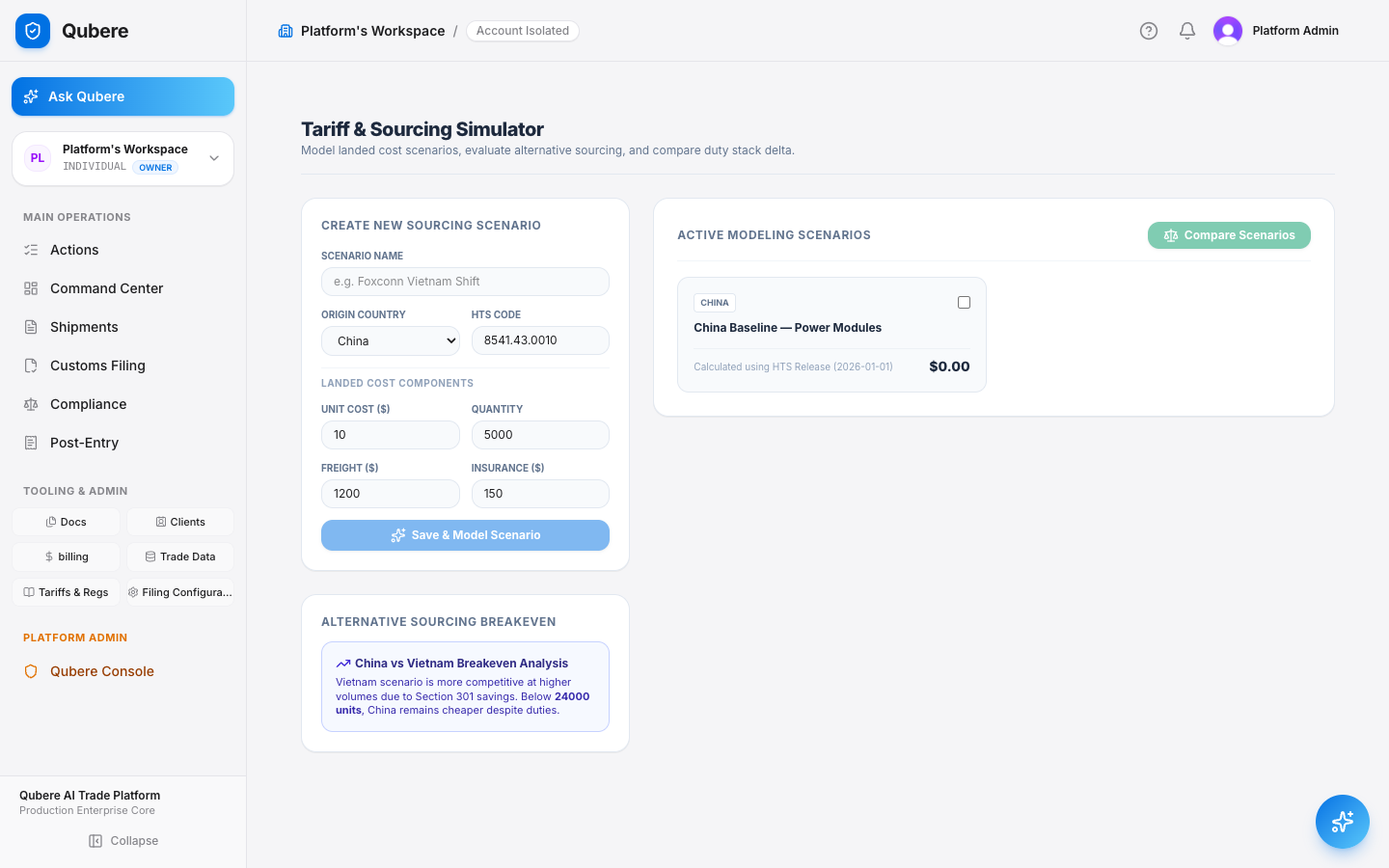
Build a landed-cost scenario by origin country and HTS code, then compare it against alternative sourcing to see the exact breakeven volume where switching suppliers actually pays off.

Use Case A supply chain lead is deciding whether to shift a product line to a new origin country and wants the real duty math, not a trade attorney's two-week turnaround.
  • Scenarios model unit cost, freight, insurance, and quantity into a full landed-cost figure
  • Duty stack includes base rate, Section 301 adders, AD/CVD, and FTA preferences
  • Side-by-side breakeven analysis shows the exact volume where an alternate origin wins
  • Every saved scenario stays in Active Modeling Scenarios for later comparison
How to on Qubere
Sidebar → Tariffs & Regs → Tariff Simulator → fill in origin, HTS, and cost components → Save & Model Scenario.
Qubere Tariff and Sourcing Simulator with a live saved scenario
Live product screenshot

Product Master

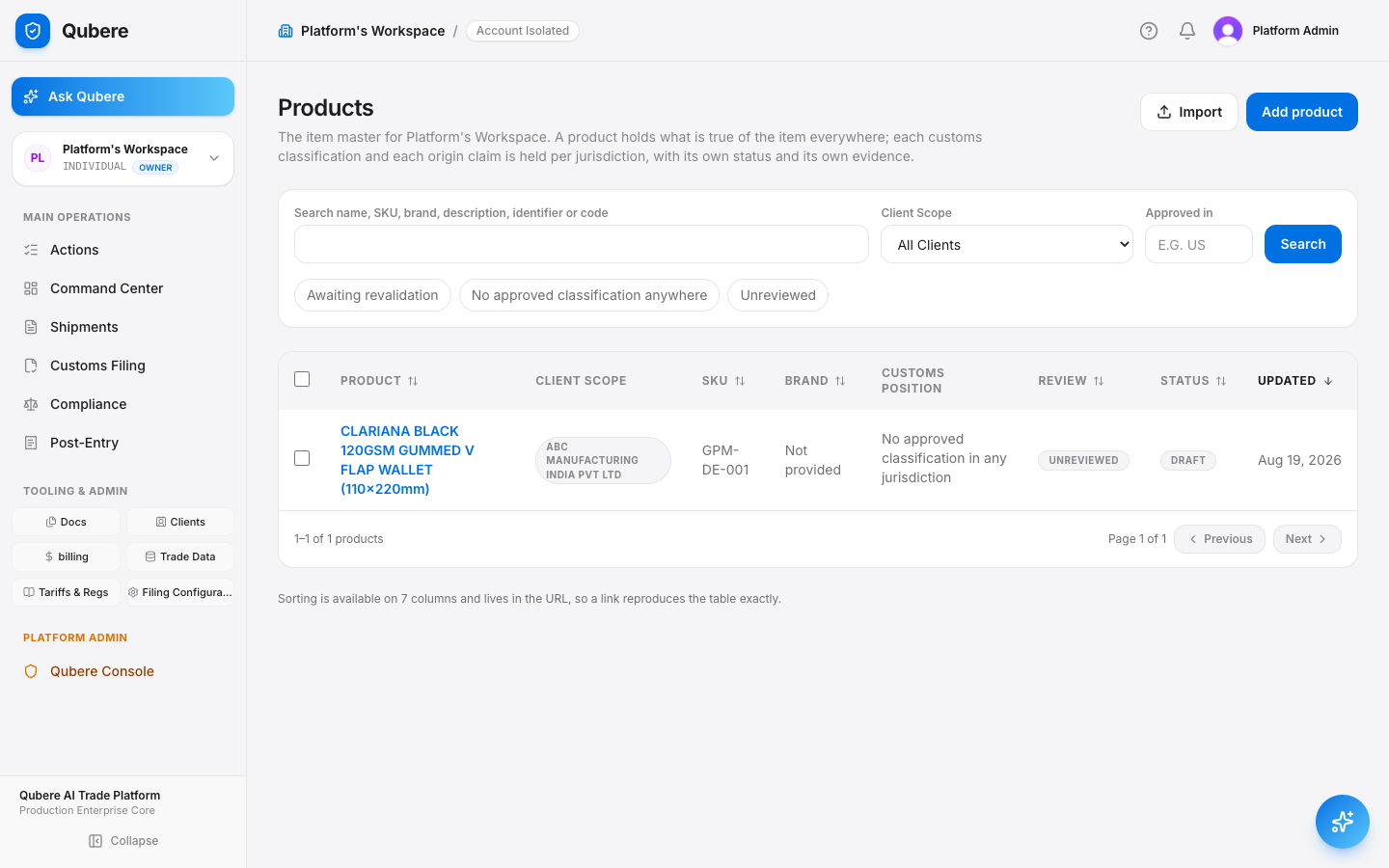
One canonical item master — with an evidence trail behind every HTS code.

A product record holds what's true of the item everywhere. Each customs classification and origin claim is held per jurisdiction, with its own review status and its own evidence, instead of one tariff code typed into a spreadsheet cell.

Use Case An importer classifies the same SKU differently across different brokers because there's no single source of truth for what the item actually is.
  • Item identity (name, SKU, brand, model) is separated from the classification decision made against it
  • Classification is proposed and approved per jurisdiction, against evidence — not typed in blind
  • Identifiers (SKU, GTIN, UPC, supplier part number) let incoming shipment lines auto-match to the right product
  • Filters surface unreviewed items, unclassified items, and anything awaiting revalidation
How to on Qubere
Sidebar → Trade Data → Products → Add product.
Qubere Product Master item list with classification status
Live product screenshot

Party Master

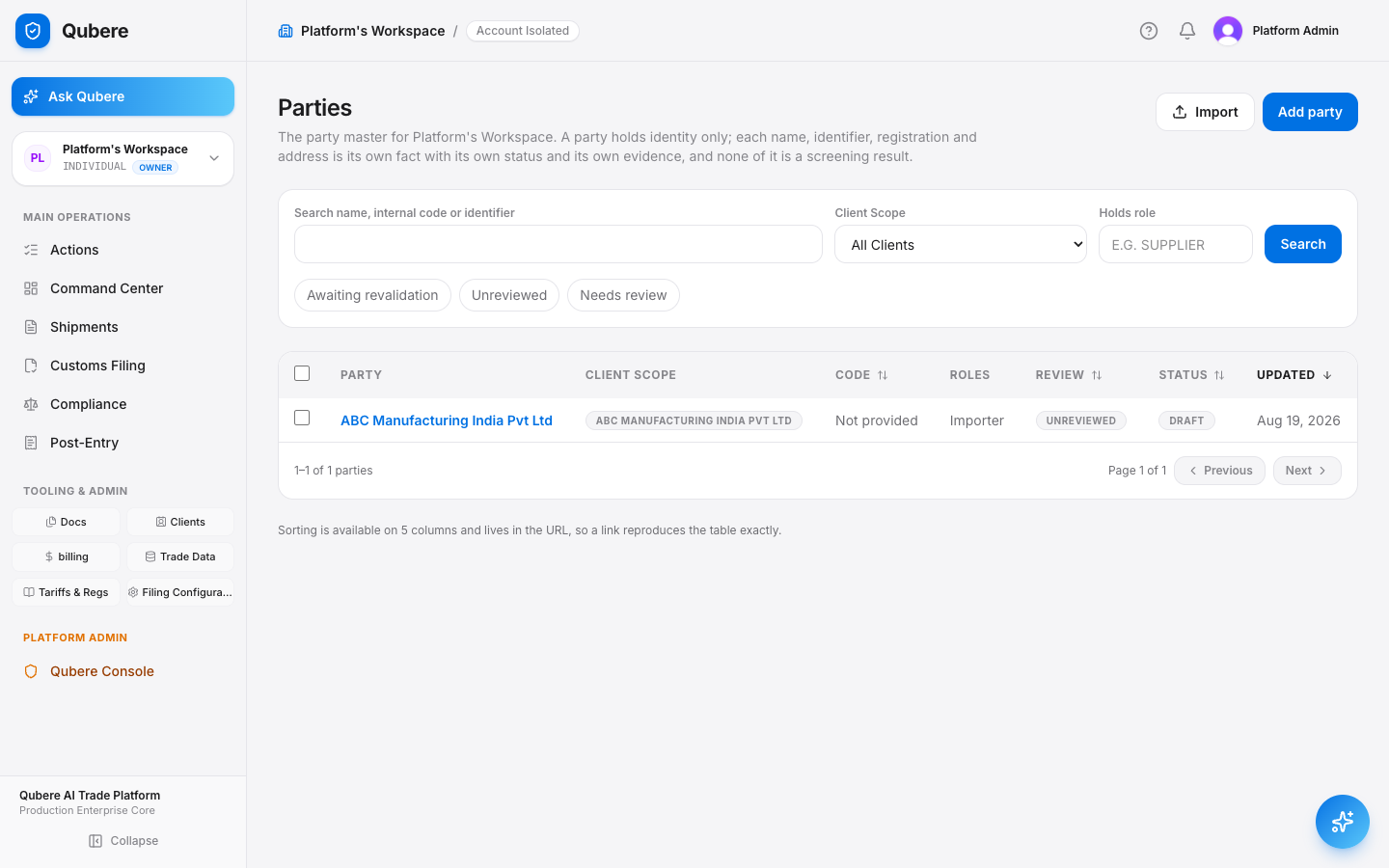
One verified record for every importer, supplier, and broker you work with.

A party holds identity only — name, identifiers, registrations, and roles — each with its own status and evidence. Screening runs against this record; it doesn't invent one.

Use Case The same supplier shows up under slightly different names across old shipment records, and restricted-party screening needs one clean identity to check against.
  • Legal name, identifiers (EORI, D-U-N-S, VAT, Tax ID), and registrations tracked as separate, evidenced facts
  • Roles (Importer, Exporter, Manufacturer, Customs Broker, etc.) assigned per relationship
  • Review status (Unreviewed, Needs Review, Awaiting Revalidation) flags stale records automatically
  • Client-scoped or account-wide — the same party record works across every shipment it touches
How to on Qubere
Sidebar → Trade Data → Parties → Add party.
Qubere Party Master list with roles and review status
Live product screenshot

Ask Qubere — AI Chat

Your entire trade operation, answerable in one question.

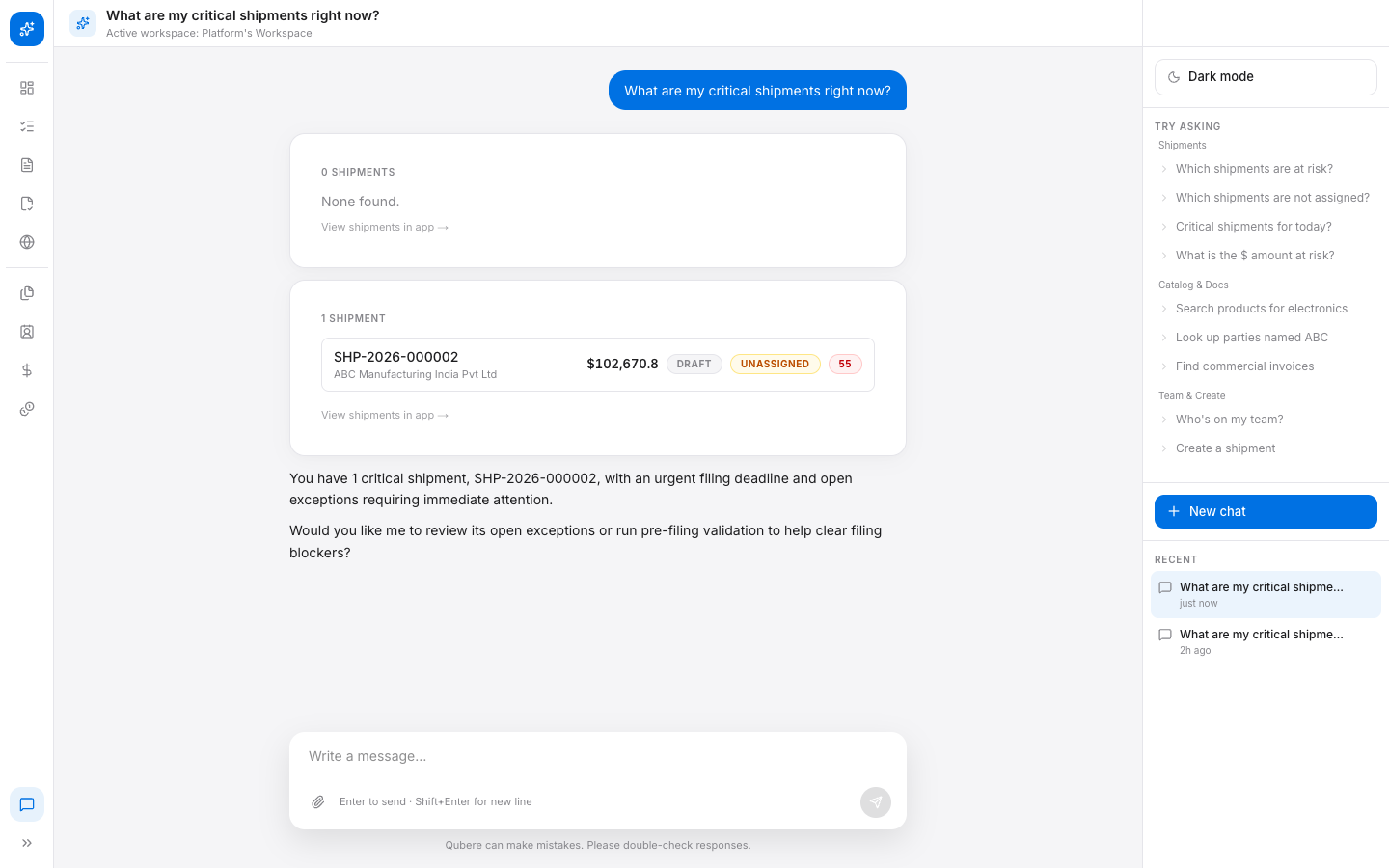
A natural-language interface into the live workspace — not a FAQ bot. Ask about risk, pull a shipment list, or create a new entry, and Qubere queries your actual data and answers with follow-up actions.

Use Case An account manager on a client call gets asked “what's at risk right now” and needs the real number in five seconds, not a callback.
  • Answers are grounded in live workspace data, not a canned script — shown live at right
  • Understands context: workspace, client, and shipment scope carry through the conversation
  • Proactively offers the next action (“Would you like me to review its open exceptions?”)
  • Can create records directly from chat — “Create a shipment for ABC Manufacturing”
How to on Qubere
Click Ask Qubere in the sidebar (or go to /chat) and type a question in plain English.
Ask Qubere live chat answering a real question about critical shipments

Reference

Feature Details

Every major capability, its benefit, and exactly where to find it on Qubere.

Feature Benefit How to on Qubere
Command Center See value at risk, overdue filings, and AI throughput in one glance, across every shipment. Sidebar → Command Center
Actions Queue AI pre-triages every decision into Blocked / Needs Review / Verified so reviewers only touch exceptions. Sidebar → Actions
Shipment Workbench One live readiness gate across 11 compliance categories, per shipment, from intake to ACE. Sidebar → Shipments → open a shipment
Trade Documents AI extracts and classifies every invoice, B/L, and packing list automatically on upload. Sidebar → Docs → Upload Document
Customs Filing Track ABI/ACE entry status end to end without logging into CBP's portal. Sidebar → Customs Filing → New Filing
Compliance Monitor Continuous embargo, end-use, and restricted-party screening, tracked live by severity. Sidebar → Compliance → Screening
Post-Entry Management Drawback, ACE reconciliation, post-summary corrections, and Form 19 protests in one hub. Sidebar → Post-Entry
Duty Drawback & Recovery One click scans filing history for unclaimed Section 301 and drawback refunds. Post-Entry → Duty Drawback → Scan for Refund Opportunities
Regulatory Intelligence Live CBP / Federal Register feed with AI impact assessment against your own catalog. Tariffs & Regs → Regulatory Updates
Tariff & Sourcing Simulator Model landed cost and sourcing breakeven before committing to a PO. Tariffs & Regs → Tariff Simulator
Product Master One item master with evidence-backed, per-jurisdiction HTS classification. Trade Data → Products → Add product
Party Master One verified identity record per importer, supplier, and broker — what screening runs against. Trade Data → Parties → Add party
Ask Qubere (AI Chat) Query risk, pull data, or create records in plain English against live workspace data. Sidebar → Ask Qubere, or /chat

New Capability · Billing & Unit Economics

"If I asked your billing team right now why a specific invoice line item is $28 — how long would it take them to answer with confidence?"

And could you tell me, off the top of your head, which of your clients you're actually losing money on? Most brokers can't answer either question cleanly. That's the entire pitch in two questions.

Real rating engine 61/61 billing tests passing Maker-checker enforced, not decorative No manual billing entry

Scene 1 · Why This Charge Exists

Click into any charge. Get the full audit trail instantly.

Open a shipment on Acme Manufacturing's ledger, click into a single charge, and walk the full trace: usage event → rate rule → rate card version → calculation → charge. No spreadsheet or legacy system gives an instant, auditable answer to "why is this $X."

Use Case A client disputes a $125 line item on their invoice. The billing coordinator needs to prove exactly why that number is correct — in the call, not after a spreadsheet reconstruction.
  • Every charge links back to the exact usage event that generated it
  • The rate rule and the specific rate-card version in effect are both named
  • A raw calculation trace shows the math, not just the result
  • This is the single most differentiated moment in the demo
How to on Qubere
Billing → Shipment Economics → open a shipment → click Review on any charge line.
ABC Customs Brokers/Billing
🔔
FM
Frank MultiAccountUser
Charge Detail & Audit Trail
SHP-2026-ACM004 · Acme Manufacturing
Gross
$125.00
Discounts / Credits
$0.00
Current Billable
$125.00
Status
RATED
Why this charge exists
Description
Entry Processing
Service Code
ENTRY_PROCESSING
Pricing Model
FLAT_FEE
Qty × Unit Price
1 × $125.00
Rate Card
Acme Manufacturing 2026 Standard v1
Usage Event
CUSTOMS_ENTRY_COMPLETED
▾ Calculation trace { "ruleId": "cmt913476...pxu1wl4", "baseRate": 125, "eventQty": 1, "includedQty": 0, "pricingModel": "FLAT_FEE", "oncePerShipment": true, "rateCardVersionId": "cmt913476...291303" }

Scene 2 · Your Rate Card, Live

Import your rate card. Map it. Activate it. In five minutes.

Upload the seeded sample CSV, map two or three line items live, and activate. This directly answers "how painful is onboarding" before they ask — and it's the real import flow, not a canned demo screen.

Use Case A brokerage's rate card lives in a spreadsheet today, with three copies floating around and no one certain which one is current.
  • CSV or Excel, parsed live — no fixed template required
  • Each service line maps to a specific Qubere billing event code
  • Creates a reviewable draft — nothing goes live until activated
  • Be honest: mapping still benefits from someone who knows both sides — not zero-touch self-service on day one
How to on Qubere
Billing → Rate Cards → Import Rate Card → Browse File — sample file at apps/custom/public/demo/billing/.
ABC Customs Brokers/Billing
🔔
FM
Frank MultiAccountUser
Import Customer Rate Card
Parse a customer CSV, map each service to a Qubere billing event, then create a reviewable draft.
acme-manufacturing-rate-card.csv
ServicePriceUnitMaps to Qubere Event
Entry Fee$125.00per shipmentCUSTOMS_ENTRY_COMPLETED
Additional Line$4.00per lineHTS_CLASSIFICATION_COMPLETED
HTS Classification Review$20.00per reviewHTS_MANUAL_REVIEW_COMPLETED
PGA Processing$35.00per entryPGA_PROCESSING_COMPLETED
Create Draft Rate Card →

Scene 3 · Billing That Doesn't Wait

Billing that doesn't wait for someone to remember to do it.

Walk through the Usage Ledger and show real classification, document, and filing events that automatically produced charges. No manual entry step exists in this flow — and that's the point.

Use Case A billing coordinator today reconstructs "what did we actually do for this client" from memory and email, days after the work happened.
  • Every classification, document extraction, and filing action emits a usage record automatically
  • Charges appear in the ledger the moment the operational work happens
  • An idempotency key on every event prevents duplicate billing on retries
  • Manual work — a classification override, a human review — emits its own billable event too, not just automated work
How to on Qubere
Billing → Usage Ledger. Filter by module (CUSTOMS / TMS / WMS) to isolate a product line.
ABC Customs Brokers/Billing
🔔
FM
Frank MultiAccountUser
Usage Event Ledger
Immutable telemetry of economically meaningful operational work.
EventShipmentSource FunctionRatedCost
Valuation & Assists Analysis
CUSTOMS/VALUATION_COMPLETED
SHP-2026-000005PipelineOrchestrator.
processEvent
Unrated$0.02
Origin Rules Determination
CUSTOMS/ORIGIN_RULES_COMPLETED
SHP-2026-000005PipelineOrchestrator.
processEvent
Unrated$0.02
HTS Classification Completed
CUSTOMS/HTS_CLASSIFICATION
SHP-2026-000005PipelineOrchestrator.
processEvent
Unrated$0.02
Document Processing
CUSTOMS/DOCUMENT_PROCESSED
SHP-2026-000005PipelineOrchestrator.
processEvent
Unrated$0.38
Filing Readiness Assessed
CUSTOMS/FILING_READINESS
SHP-2026-NST003PipelineOrchestrator.
processEvent
Unrated$0.04

Scene 4 · Revenue Leakage Detection

We'll tell you when you're losing money — not your quarterly review.

Show the pre-seeded negative-margin client and the open exception it produced, then resolve it live with a reason. This is where "revenue leakage detection" stops being a bullet point and becomes something they just watched happen.

Use Case A rate card is underpriced relative to actual cost, and nobody finds out until a margin review months later — if ever.
  • Shipment Economics surfaces gross margin per shipment, per client, live
  • Exceptions flag missing rate cards, unmapped events, and negative margins automatically
  • Resolving or waiving an exception requires a reason — tied to a user and timestamp, forever
  • This is genuinely actionable now, not a read-only report
How to on Qubere
Billing → Shipment Economics to spot the margin, then Exceptions & Leakage to resolve it.
ABC Customs Brokers/Billing
🔔
FM
Frank MultiAccountUser
Shipment Economics
ShipmentClientRevenueCostMargin
Meridian Apparel Group$122.75$173.00-40.9%
Acme Manufacturing$125.00$6.8794.5%
Exceptions & Revenue Leakage
MISSING_RATE_CARDSHP-2026-MER002
No active, effective rate card found for client.
Resolve
CONDITION_FIELD_MISSINGSHP-2026-ACM004
CONDITIONAL rule fired against a usage event missing its referenced metadata field.

Scene 5 · Real Approval, Not a Status Label

Real approval. Not just a status label.

Create a draft invoice from unbilled Acme charges, and be explicit that sending or approving requires a different permission than drafting. This is a genuine control, backed by automated tests — not UI theater.

Use Case A billing coordinator drafts an invoice. Their manager, with a distinct permission, must approve it before it can send — the same person cannot do both.
  • Invoice lines trace back to the exact usage events that produced them
  • Manual work — a Human Classification Review — shows up as its own billable line
  • billing.invoices.approve is a distinct permission from .create
  • 8 automated permission-denial tests enforce this — worth saying out loud to a technical buyer
How to on Qubere
Billing → Invoices & AR → Create New Invoice from unbilled charges → Approve.
ABC Customs Brokers/Billing
🔔
FM
Frank MultiAccountUser
PENDING_APPROVAL INV-202608-6314C61B
Invoice — Acme Manufacturing
Subtotal
$149.00
Total Amount
$149.00
Paid
$0.00
Balance Due
$149.00
DescriptionShipmentQtyAmount
Entry ProcessingSHP-2026-ACM0031.00$125.00
Additional LinesSHP-2026-ACM0036.00$4.00
Human Classification ReviewSHP-2026-ACM0031.00$20.00
Total   $149.00
🔒 Approve Record Payment requires billing.invoices.approve — different role than the drafter

Scene 6 · The Renewal Conversation

"What if we raised this rate?" Answered in seconds, not a multi-day Excel exercise.

Open Acme's draft v2 rate card and run the simulation against real historical usage — current vs. proposed revenue and margin. This is the tool a team would use every renewal cycle, not just once at onboarding.

Use Case "What would we have made if we'd charged Acme our new proposed rate for the last quarter?" is a multi-day Excel exercise today, if anyone attempts it at all.
  • Runs a proposed rate card against real historical usage events
  • No charges are created or modified — a pure simulation
  • Breaks the delta down service-by-service, not just a single number
  • Pivot point for expansion/renewal conversations, not just the first sale
How to on Qubere
Billing → Rate Cards → Acme Manufacturing 2026 Standard (v2 Draft) → Simulate → Run Simulation.
ABC Customs Brokers/Billing
🔔
FM
Frank MultiAccountUser
Rate Card Simulation — Acme Manufacturing 2026 Standard
Simulating v2 (DRAFT) against 3 months of historical usage events. No charges created or modified.
Proposed Revenue
$670.50
Actual Revenue
$654.00
Revenue Delta
+$16.50
Change
+2.5%
14 / 28 events matched
By Service
ServiceProposedActualDelta
ENTRY_PROCESSING$500.00$500.00$0.00
PGA_PROCESSING$70.00$70.00$0.00
ADDL_LINES$60.50$44.00+$16.50

Objection Handling

Every hard question, answered directly.

"Our current system already does billing." Ask what it takes today to answer "why is this charge $X" and "which clients are unprofitable" with confidence, in under a minute. Most legacy systems bill by transaction count, not capability or outcome.
"How long does onboarding take?" Rate-card import and activation is fast and demoable live. Mapping commercial line items to Qubere's billing events benefits from someone who understands both sides — don't pitch it as fully zero-touch on the first call.
"Is this just for customs, or freight/TMS too?" Yes to both, on a shared platform. TMS carrier payments (AP) and customs/TMS client billing (AR) are intentionally separate ledgers by design — unified at the account and reporting level, not merged into one invoice type. Worth mentioning as platform direction, not overselling as fully unified today.

"Every number you just saw traces back to real work, in real time, with a real audit trail. Nothing you saw was a mockup — it's the same engine that would be running your books from day one."

1 / 39