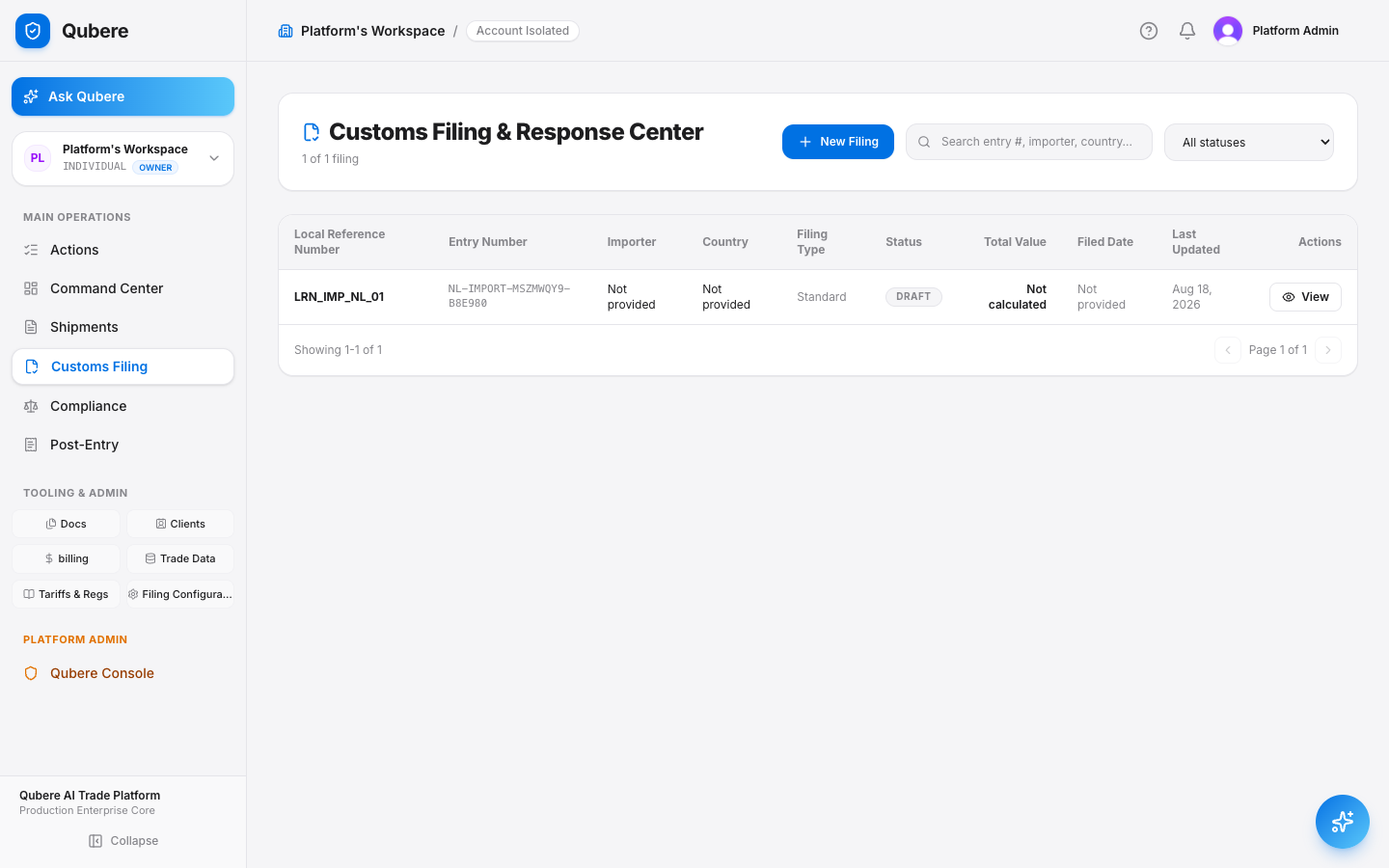
Qubere

Agentic Compliance and Customs
End-to-End Customer Demo

From inbound trade documents to evidence-backed compliance decisions, broker approval, customs transmission and continuous monitoring.

Demo promise

Automate the routine flow. Surface the exceptions that need human judgment. Preserve the evidence behind every decision.

Demo story & operating model

One transaction, one control plane

The demonstration should feel like one transaction moving through a continuous control plane — not a tour of disconnected modules.

1Customer / ERP / Email
2Document Intake & Security
3Qubere Document Intelligence — classify, extract, validate, enrich
4Shipment Workspace / Digital Transaction
5Classification + Party + Compliance Controls
6Network & Ownership Intelligence — Auto-Triggered EDD
7Compliance Readiness & Exception Management
8Customs Filing Preparation
9Broker Review / Maker-Checker
10Customs Transmission & Authority Response
11Audit, Evidence, Reporting & Continuous Monitoring
Opening narration
“Qubere turns incoming trade documents into a compliance-validated, customs-ready transaction. AI helps understand, investigate and explain; deterministic engines govern regulated decisions; humans remain responsible for exceptions, approvals and overrides.”

Customer outcome: my team manages exceptions, not every transaction.

Live product screenshot

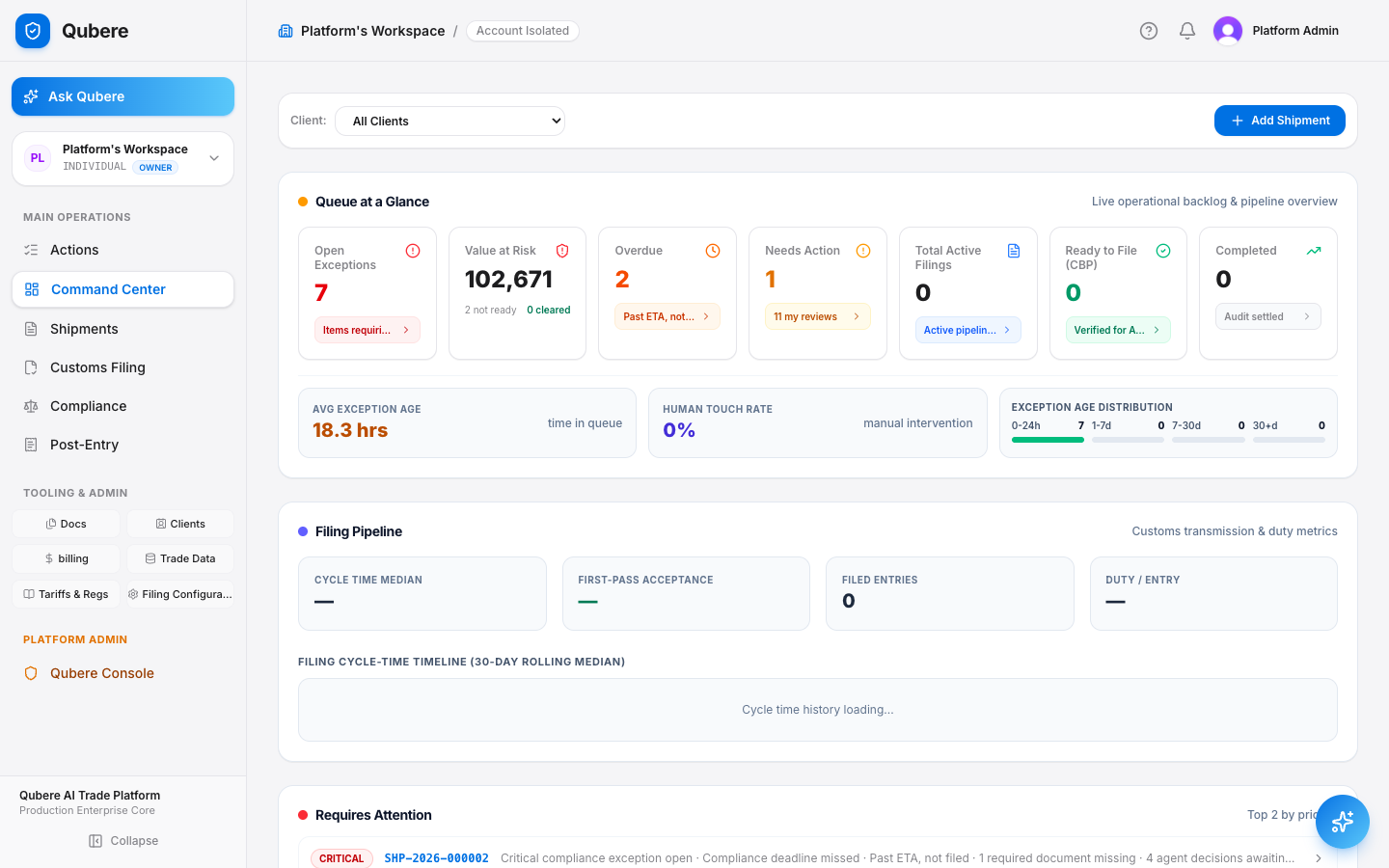
Step 1 · Command Center

Establish the operating model

Open the Qubere Command Center before opening individual modules.

  • Shipments requiring attention and ready-to-file work
  • Compliance reviews, blockers and document processing
  • Broker approvals, tasks/exceptions and regulatory updates where available
Demo narration
“Instead of people checking multiple systems to decide what can move, Qubere brings the transaction state, compliance state and required human action together.”
Qubere Command Center dashboard showing live queue, filing pipeline, and shipments

Step 2 · Inbound Transaction

Start where trade operations actually begin

Open Admin → Settings → Inbound Email Addresses and show the client/workspace-specific inbound address.

  • Send a prepared commercial invoice or packing list from a separate mail client
  • Intake begins automatically on receipt — no manual triage step
  • The same operating model supports other integration channels only where those integrations are actually enabled
Demo narration
“Nobody on your team should have to notice that an email arrived. Send Qubere the trade document and the intake process begins automatically.”
Admin/Settings/Inbound Email
AC
Alice · Acme
WorkspaceInbound addressStatus
Acme Importsacme-imports@intake.qubere.aiActive
Northwind Customsnorthwind@intake.qubere.aiActive
tenant-scoped routingauto-triggers Document Intelligence
Live product screenshot

Step 3 · Document Intelligence & Source Evidence

Understanding with traceability, not black-box extraction

Open Documents / Inbound Review and the received document.

  • Detected document type and extracted fields — invoice number, parties, currency, value, products, quantity, weight, origin and Incoterms where present
  • Open field review and show the source PDF
  • Where bbox evidence exists, select an extracted field and highlight its source region
  • Qubere Magic Marker — on a wrong field, click “Mark on document” and drag a box around the correct text on the page; the field fills itself, no retyping
  • Qubere Learns — that correction is remembered per account/document type/field, so the next extraction for the same account applies it automatically
  • Where the platform detects multiple documents merged into one PDF, it suggests a split; confirming it re-enters each child through the standard extraction pipeline
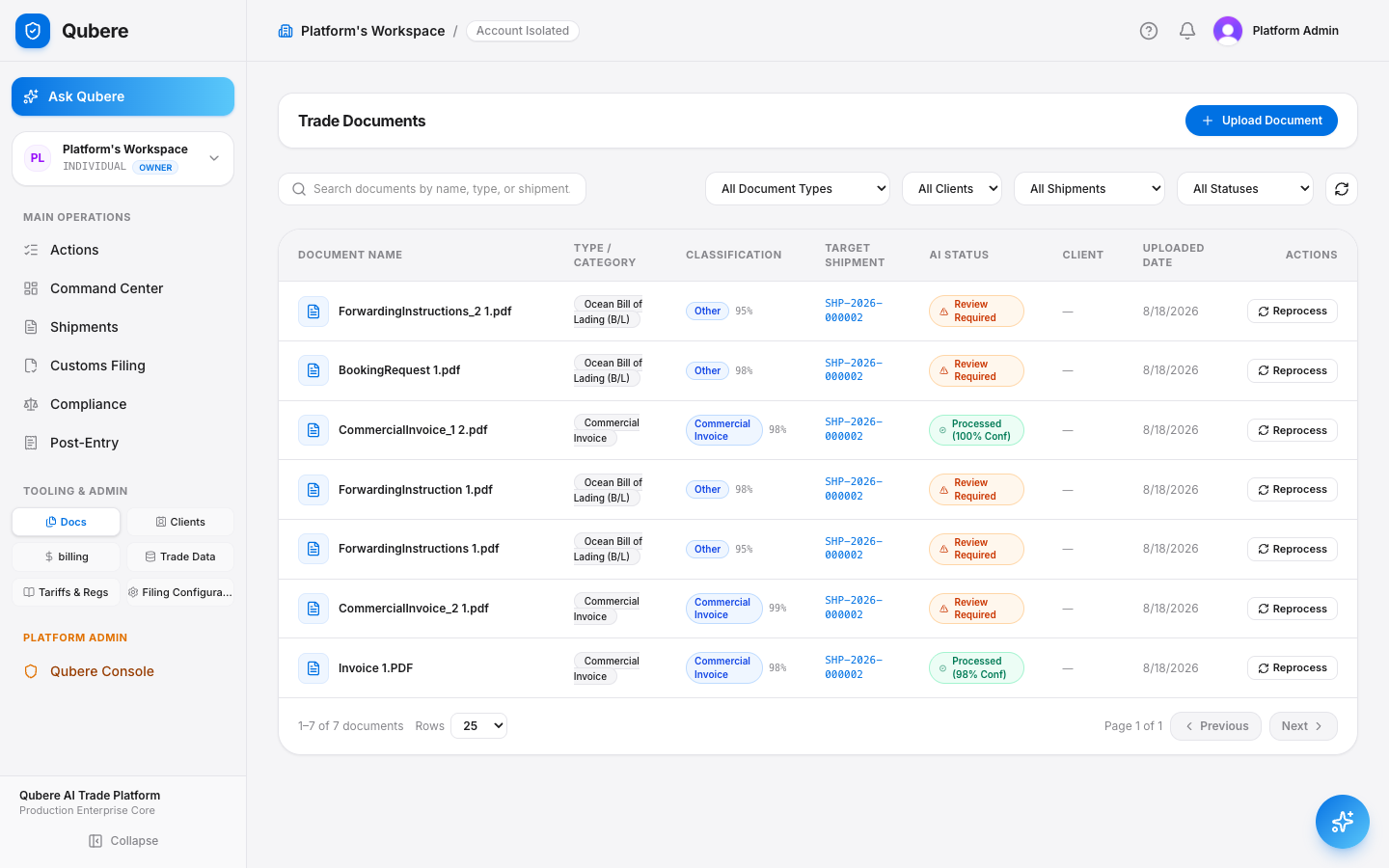
Demo narration
“The important part isn't simply that AI extracted a value. Qubere preserves where that value came from, so a reviewer can validate the exact source evidence — and if it's wrong, one drag on the page fixes it and teaches the account going forward.”
Qubere Trade Documents vault with AI extraction status per document
Live product screenshot

Step 4 · Shipment Creation & Enrichment

Turn extracted information into the operational transaction

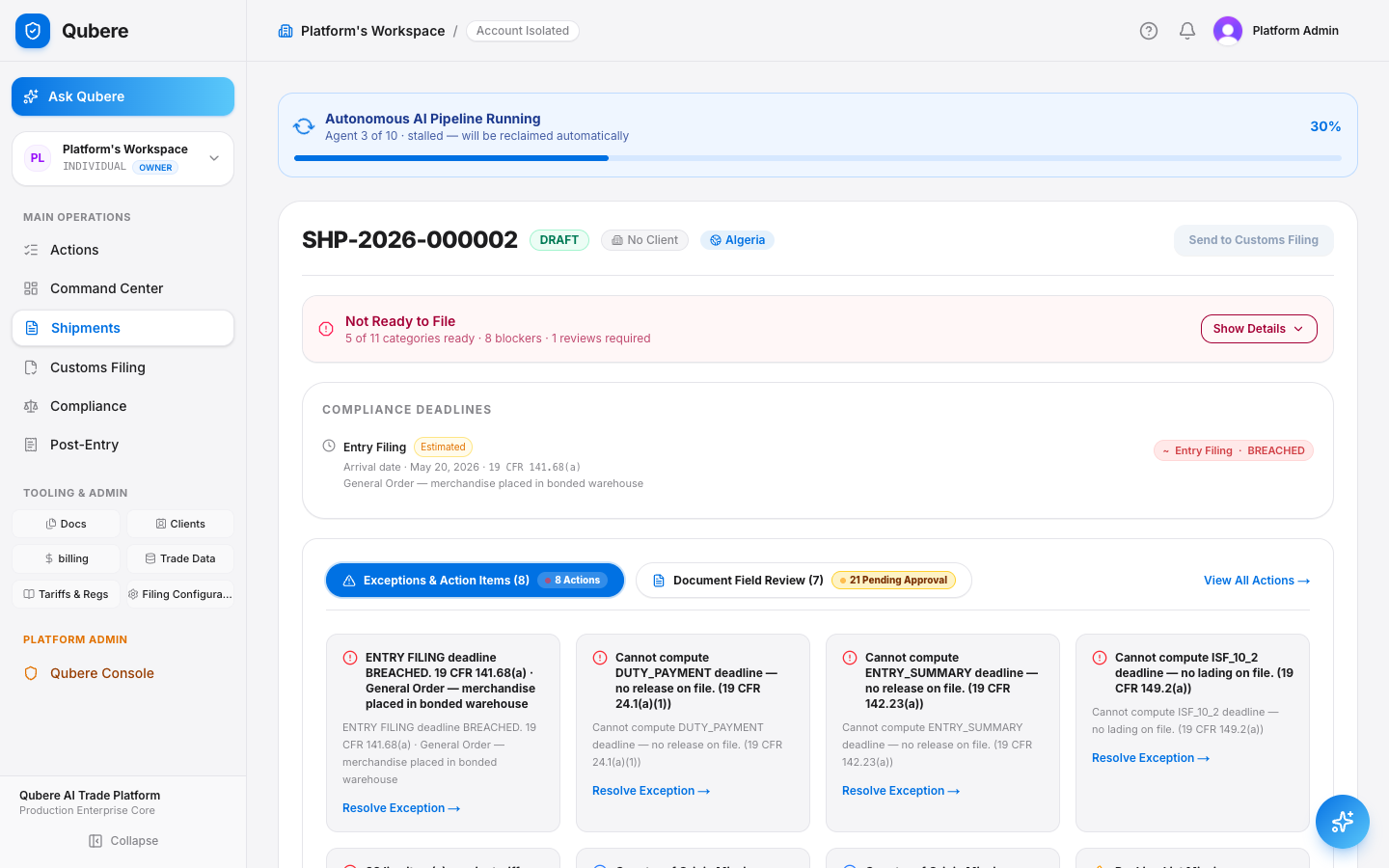
Open the matched/created Shipment.

  • Exporter/importer/consignee, invoice, value, currency, origin, transport, line items and documents
  • Downstream compliance and filing use the same canonical transaction rather than separate re-keyed copies
Demo narration
“Document processing is not the end of the workflow. The validated information becomes part of the shipment that compliance and customs filing operate on.”
Qubere Shipment Workbench with parties, value, transport and line items
Live product screenshot

Step 5 · Product Classification

Auditable classification and evidence sufficiency

Open a shipment line/product classification.

  • Description, part number, origin, HS/HTS classification, status and rationale/evidence where available
  • Demonstrate VERIFIED, NEEDS REVIEW or blocked/insufficient-description behavior if available
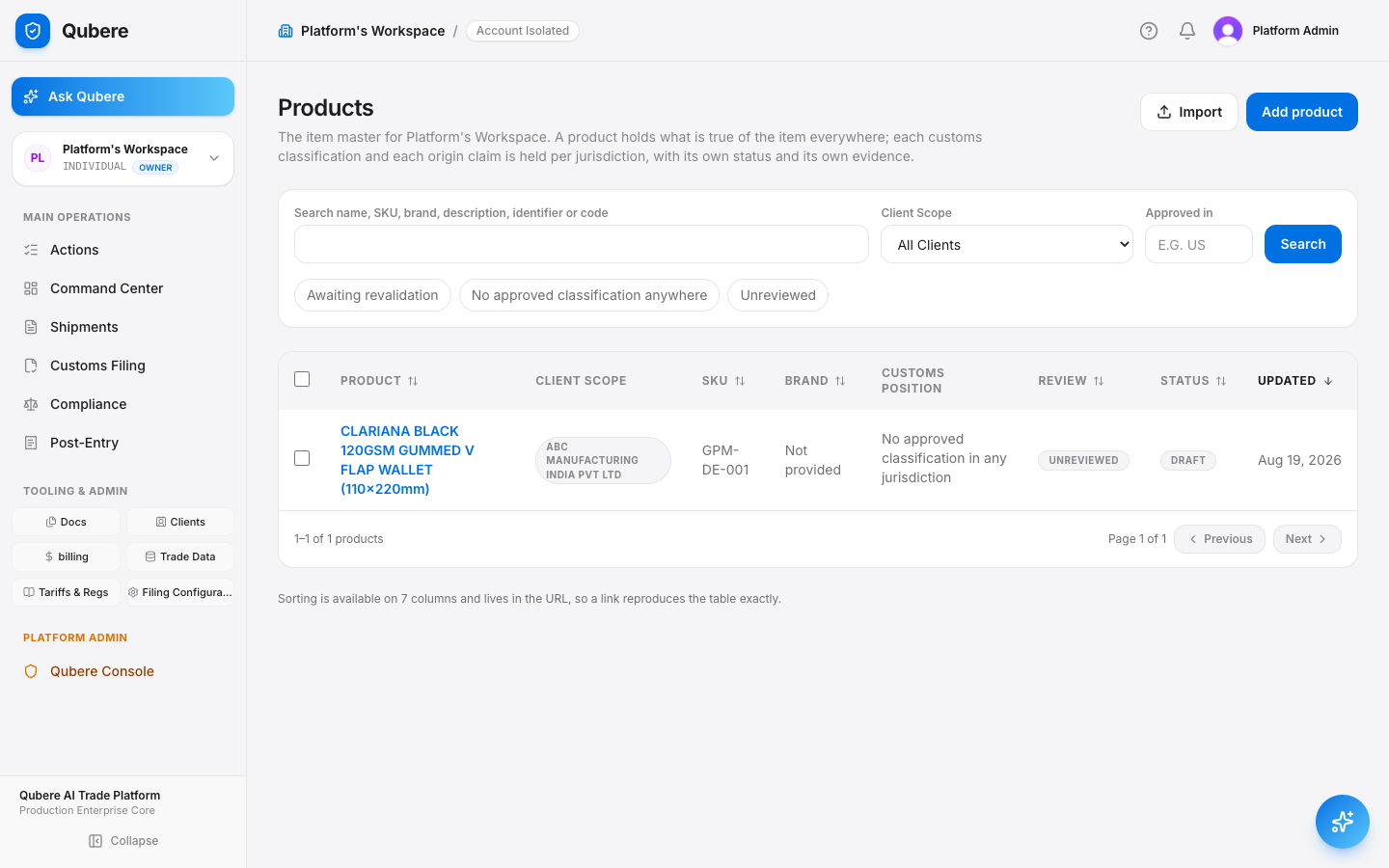
Demo narration
“Qubere can assist classification, but it does not manufacture certainty. When the evidence is insufficient, the transaction is surfaced for review rather than silently approved.”
Qubere Product Master item list with classification status
Live product screenshot

Step 6 · Restricted Party Screening

Automatic party screening, evidence-backed review

Open Compliance → Restricted Party Screening.

  • Shipment parties already screened without a user starting a separate job
  • Open a CLEAR result and show source/reference evidence
  • Use a prepared review case to demonstrate a potential match, alias/country/address evidence and reviewer disposition
  • Open Compliance → Screening → Matcher Quality: precision and false-positive rate computed live from your own reviewed dispositions, plus a threshold sweep — not a vendor-claimed accuracy number
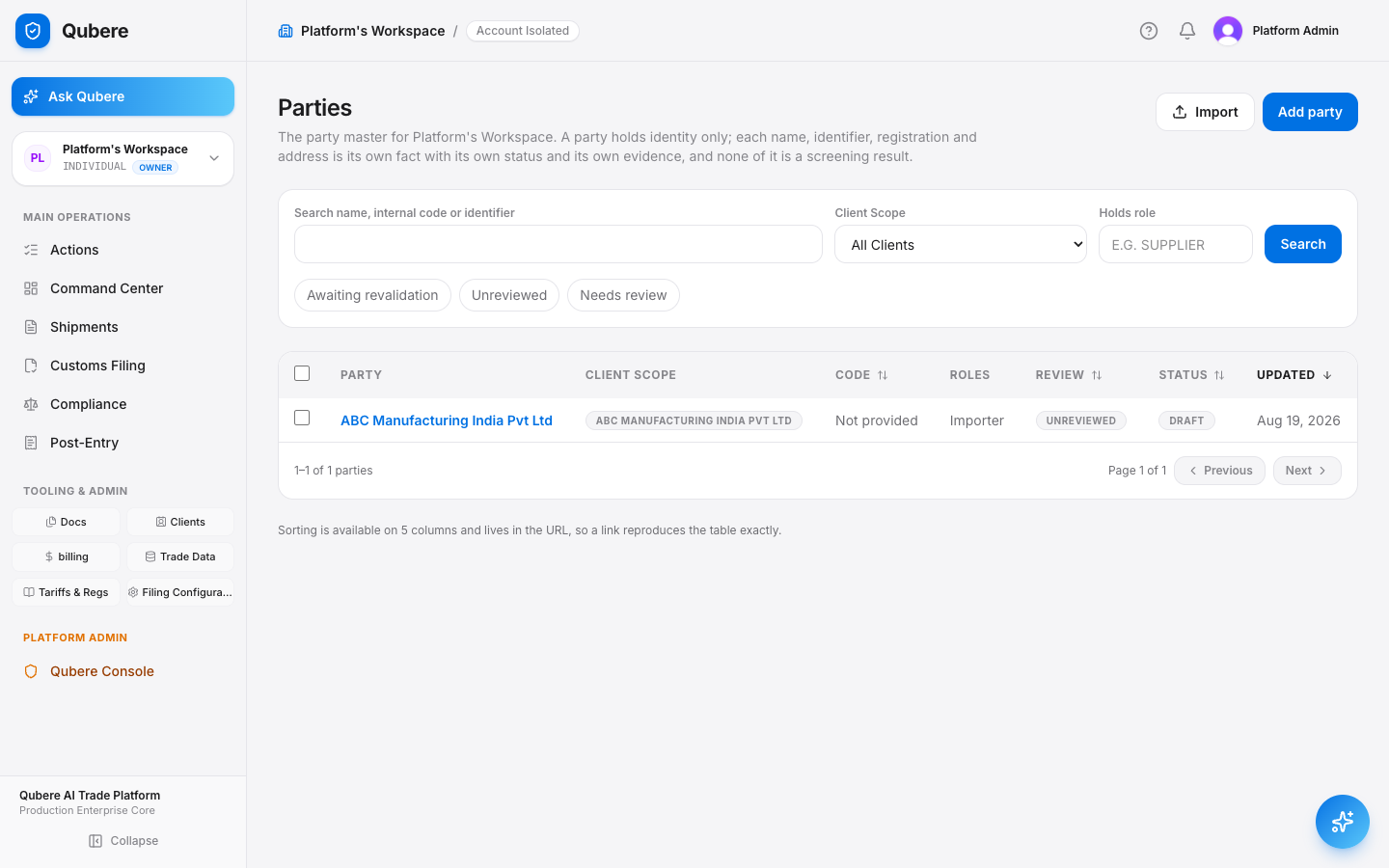
Demo narration
“A candidate match is not automatically a sanctioned-party conclusion. Qubere narrows candidates efficiently, then applies the canonical identity-matching logic and preserves the evidence for review. An alternate re-ranker weighting runs alongside every match, silently, for governance to compare before it's ever promoted — and the same pipeline screens party names extracted straight out of document narratives, not just structured party records. Screening-on-create is an account-level choice; either way, a scheduled sweep re-screens anything whose result has aged out.”
Qubere Party Master list with roles and review status

Step 7 · Network & Ownership Intelligence / EDD

A name match is where the review starts, not where it ends

Open Compliance → Network & Ownership Intelligence for the same party.

  • Show the relationship graph — ownership, management and vessel-identity edges — traversed out from the matched entity
  • Open a prepared case where the graph reaches a sanctioned director/officer or a conflicted ownership path, and show the EDD case Qubere opened automatically
  • Point out the aggregate ownership percentage: a real number when the chain resolves, or an explicit “incomplete” state rather than a guess
Demo narration
“Qubere doesn't stop at the name. It walks the relationship graph, and the moment that graph surfaces something serious enough — a sanctioned officer, a conflicted ownership record — it opens a due-diligence case for your analyst automatically, once per party, so nothing sits unassigned.”
Compliance/EDD Case Workspace
AC
Alice · Acme
Relationship evidence
PathDIRECTOR_OF · 1 hop · currently published sanctioned entity
Aggregate ownershipdata incomplete
one case per unresolved party, idempotent
Live product screenshot

Step 8 · Broader Compliance Controls

Compliance is more than a denied-party lookup

Show that Embargo is a separate country/jurisdiction control.

  • End-use/end-user indicators — military, nuclear/missile/chem-bio, rocket/UAV — where configured
  • Anti-boycott findings where a prepared document contains relevant language
  • Forced Labor/UFLPA checks if live in the demo environment
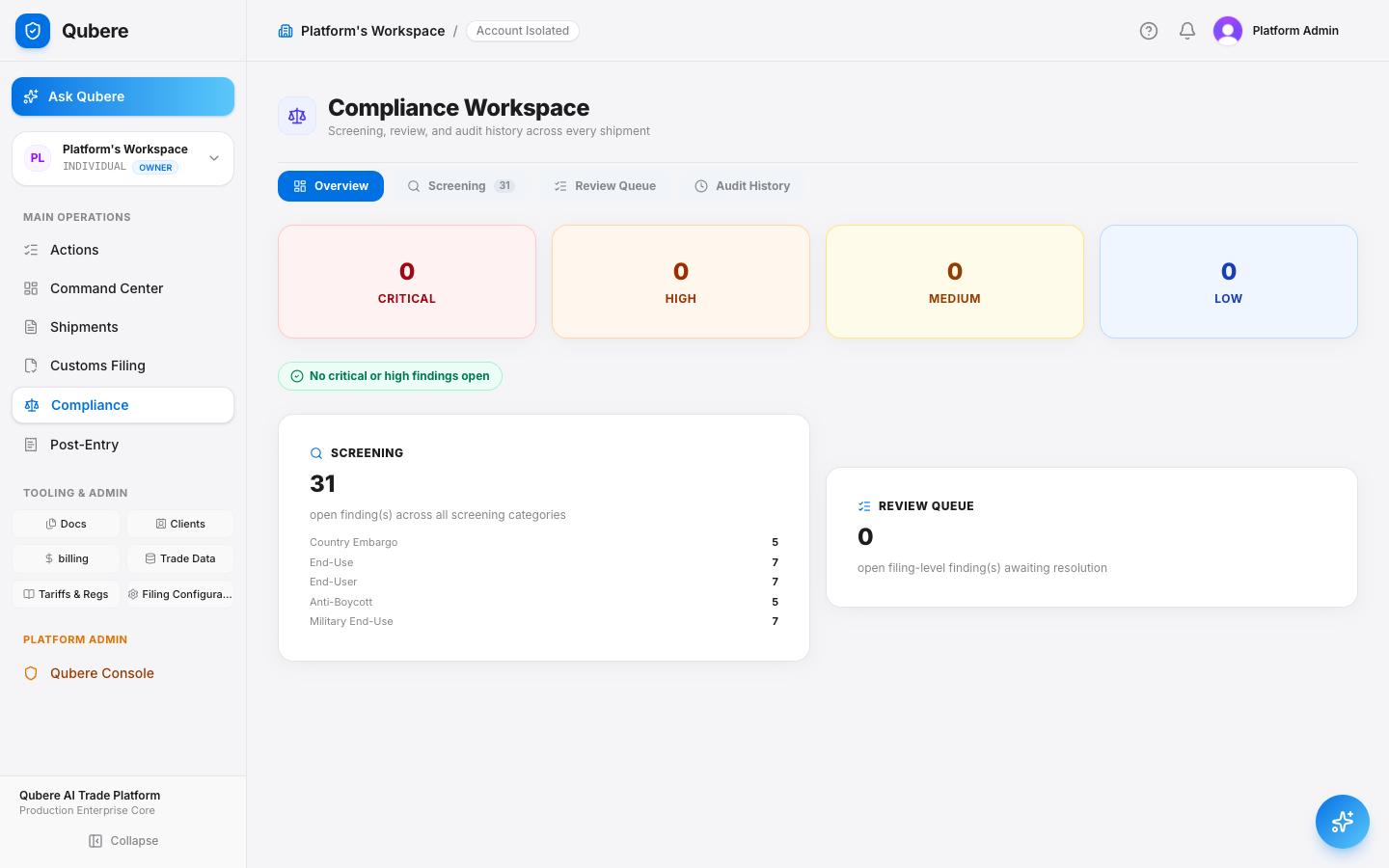
Demo narration
“Restricted-party screening answers who we are dealing with. Embargo, end-use, forced-labor and anti-boycott controls answer different questions. Qubere keeps those decisions distinct and brings them together at the transaction level.”
Qubere Compliance Workspace showing screening findings by category

Step 9 · License Determination & Management

Connect classification, parties, countries and end-use to licensing

Open License Determination.

  • Jurisdiction, import/export direction, classification, destination, end user/end use, applicable rule and determination
  • If a license is required, open the managed license and show validity, parties/products, authorized amount and utilization
Demo narration
“The copilot may explain the persisted determination, but it does not recalculate or override the regulated decision. Missing required rule data never becomes ‘No License Required.’”
License Management/Determination
AC
Alice · Acme
⚑ REVIEW_REQUIRED
Reasonsensitive end-user flag · hard stop
Evidence — what was evaluated
Classification format (ECCN)valid
End-use conditions2 true · 1 unknown
Country control-rule datasetRULE_DATA_UNAVAILABLE
utilization ledgerexpiry / utilization alerts

Step 10 · Shipment Compliance Readiness

The consolidated readiness state as the operational centerpiece

Show document, classification, RPS, embargo, forced-labor, end-use, license, data-quality and filing readiness statuses where available.

  • Use a clean example to show READY FOR FILING
  • Use an exception example to show REVIEW REQUIRED / BLOCKED with explicit blockers
Demo narration
“Users shouldn't have to open eight modules and mentally calculate whether a shipment can proceed. Qubere continuously evaluates what is ready, what is blocked and exactly what needs attention.”
Shipment SHP-10293/Compliance Readiness
AC
Alice · Acme
Documents
Complete
Classification
Verified
RPS / Embargo
Clear
License
Review
⚑ REVIEW REQUIRED
BlockerLicense determination pending sensitive end-user review
recomputed on every material change
Live product screenshot

Step 11 · Exception-Driven Operations & Ask Qubere

AI assists without becoming the authority

Open Tasks / Exceptions and show items such as party review, missing origin evidence, classification review or license information required.

  • Ask Qubere: “Why is shipment SHP-10293 ready for filing?”
  • The answer references persisted compliance decisions/evidence rather than generating a new compliance outcome
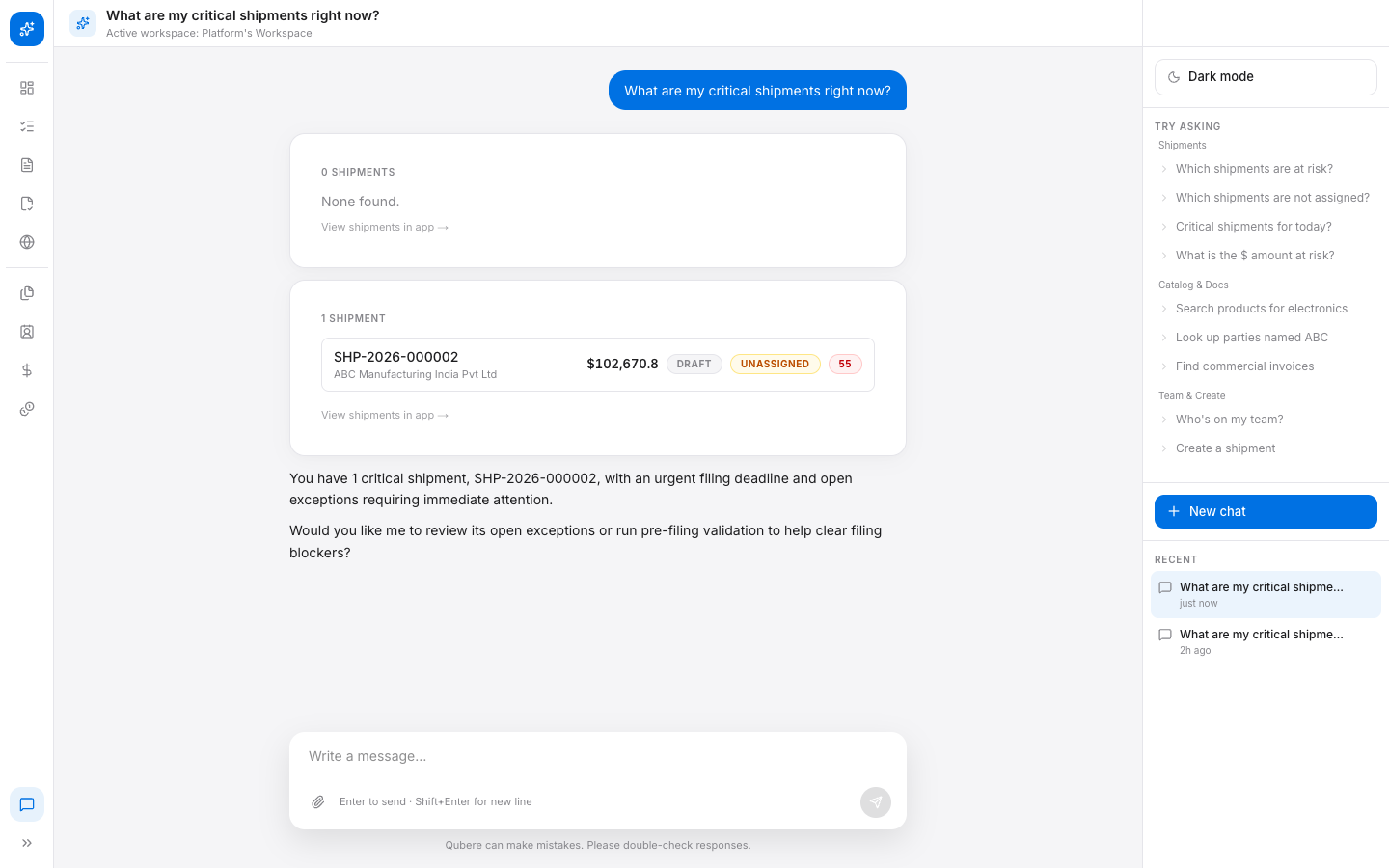
Demo narration
“Qubere AI connects the evidence, explains why something happened and helps prepare the next action. The authoritative compliance result still comes from the governed engine.”
Ask Qubere chat answering a shipment readiness question with linked evidence
Live product screenshot

Step 12 · Customs Filing Preparation

From compliance-ready shipment to declaration, without re-keying

Open Customs Filing → New or the prepared filing.

  • Importer/exporter/consignee, declaration lines, classification, origin, quantity, value, currency, transport and documents populated from the reviewed shipment
  • Show filing validation and readiness
Demo narration
“Once the shipment is compliant and ready, we move into filing using the same validated transaction. We aren't re-keying the invoice into another system.”
Qubere Customs Filing screen with declaration lines populated from the shipment

Step 13 · Broker Review / Maker-Checker

Controlled automation and accountability

Advance the filing to ReadyForBrokerReview and show the prepared-by identity.

  • Switch to the second demo user and approve — show BrokerApproved and approved-by identity
  • If a second user is unavailable, demonstrate/narrate the control that prevents the preparer approving their own filing
Demo narration
“Automation does not mean removing accountability. Qubere enforces maker/checker segregation so preparation and approval remain controlled actions.”
Customs Filing/FIL-2026-000188
DK
Dana · Broker
StageActorTimestamp
PreparedA. Chen09:12:04
ReadyForBrokerReviewsystem09:12:05
BrokerApprovedD. Kessler09:24:41
preparer ≠ approver, enforced

Step 14 · Transmit & Customs Response

Complete the operational lifecycle

In DEMO/SANDBOX only, transmit the approved filing.

  • BrokerApproved → SUBMITTED on transmit — confirm the demo account's seeded declaration workflow before relying on any further status live
  • Where the demo account's configured workflow produces it, show Accepted, CustomsHold, Released or rejection response states
  • For a rejection scenario, explain the correction → revalidation → retransmission loop
Demo narration
“The authority response becomes part of the same transaction. If customs rejects or holds it, Qubere turns that response into an operational exception rather than another disconnected message.”
Customs Filing/Transmission
DK
Dana · Broker
StatusDetailTimestamp
BrokerApprovedReady for transmission09:24:41
SUBMITTEDMessage sent to CBP/ACE-ABI09:24:50
ReleasedCBP entry accepted, cargo released — per configured declaration workflow09:41:03
rejection → correction → revalidation → retransmission

Step 15 · Audit & Evidence Trail

Close the transaction with defensibility

Open filing activity and Compliance execution/audit history.

  • Trace email received → document processing → field review → shipment → screening → licensing → filing preparation → broker approval → transmission → customs response
  • Show preparer, approver and transmitter identities where available
Demo narration
“Qubere doesn't just tell you the final status. It preserves the evidence chain that produced it — who did what, what rules/reference data were used, and when.”
Compliance/Audit History
AC
Alice · Acme
TimeActionEntityActorSrc
09:41:03FILING_RELEASEDFIL-2026-000188CBP/ACEPIPE
09:24:41FILING_BROKER_APPROVEFIL-2026-000188D. KesslerUI
09:12:05RPS_RESCREENPTY-4471systemPIPE
email received → ... → customs response

Step 16 · Continuous Monitoring / RDPS

Compliance does not stop after a point-in-time CLEAR

Open Continuous Party Monitoring / Reference Data Changes if available.

  • A changed/new restricted-party reference record triggers targeted re-screening
  • Show previous result vs current result and affected open shipments/filings
Demo narration
“A party that was clear yesterday may change tomorrow. Qubere can connect a reference-data change to the affected party population, re-screen the right records and surface the operational impact.”
Compliance/RDPS · Continuous Monitoring
AC
Alice · Acme
Open RDPS alerts
3
Parties monitored
2,184
Re-screened (24h)
47
Last full sweep
04:00 UTC
Change set OFAC-SDN 2026-08-28 · 62 entities added → Impacted Parties (2)
PartyBeforeAfterTransition
Severstroy OOOCLEARHITNEW_HIT
Baltic Marine LtdPOTENTIALHITESCALATED
Live product screenshot

Step 17 · Regulation-to-Impact-to-Action

The strategic Agentic Customs differentiator

Open Regulatory Intelligence / Reference Data Changes where available.

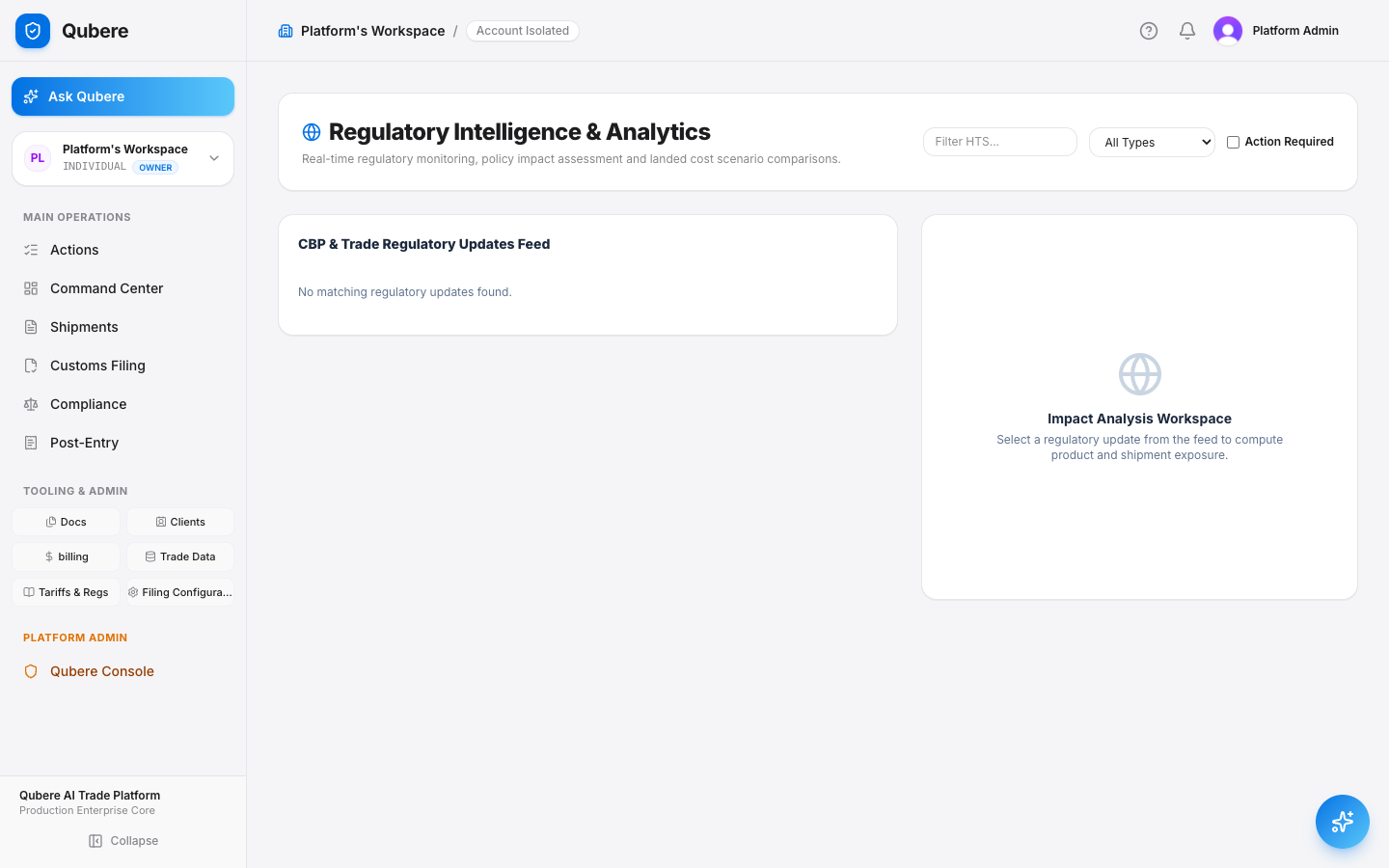
  • Regulation/reference change → affected HTS codes → matched products → open shipments → auto-created blocking exceptions — click through this chain live
  • Party-population impact runs on the same principle through continuous monitoring (RDPS, Step 16), as a separate pipeline — narrate the connection to license determinations and filings rather than clicking through it as one flow
  • Ask Qubere: “What is impacted by today's regulatory changes?”
Demo narration
“The goal isn't just to tell you that a regulation changed. Qubere connects the change to the shipments it affects and opens the exceptions your team needs to act on.”
Qubere Regulatory Intelligence and Analytics feed

Run-of-show

20-Minute Demo Run-of-Show

A tight, timed pass through the whole story — adjust pacing to the audience without dropping a stage.

TimeStoryPurpose
0:00–1:00Command CenterSet the Agentic Customs operating model
1:00–3:00Inbound intakeEmail/client routing and secure intake
3:00–5:00Document IntelligenceExtraction + source evidence
5:00–7:00Shipment + classificationCanonical transaction and product decision
7:00–10:00ComplianceRPS, network & ownership intelligence/EDD, embargo, end-use, UFLPA/anti-boycott as applicable
10:00–12:00License + readinessDetermination and consolidated readiness
12:00–14:00Exceptions + Ask QubereExplain, prioritize and prepare action
14:00–17:00Customs filingPreparation, broker approval, transmission
17:00–19:00Audit + RDPSEvidence trail and continuous monitoring
19:00–20:00Executive closeRegulation → Impact → Action

Optional for EU-importing customers: CBAM Intelligence (opens on Manage > Imports; Annual Declarations and certificate holding). Say plainly that the Art 26 penalty base amount is not ingested and IEA-derived data is behind an uncleared licensing gate. Use the CBAM Intelligence deck for detail.

Customer questions to be ready for

Every hard question, answered directly.

"Do we lose the original document?"No. Open the Shipment Documents view. The source PDF remains available as evidence, and extracted fields can point back to it where source evidence exists.
"What happens when the AI gets a field wrong?"A reviewer drags a box around the correct text on the page (Qubere Magic Marker) instead of retyping it, and that correction is remembered per account/document type/field (Qubere Learns) so future extractions for that account apply it automatically.
"What stops a bad filing going out automatically?"Show the filing state machine and broker gate. The current demo requires ReadyForBrokerReview → BrokerApproved before transmission, with maker/checker segregation.
"Do you only screen sanctioned names?"No. Demonstrate restricted-party screening alongside configured end-use and anti-boycott controls, and other compliance domains that are live.
"Who is accountable?"Show filing preparer, approver and transmitter identities plus Compliance execution/audit history.
"Can this operate per client?"Show client/workspace-specific inbound addresses and tenant-scoped workflow.

Demo preparation & recovery

Prepare once. Recover gracefully.

Preparation

Use a DEMO or SANDBOX workspace — never a live transmission against production.
Have a commercial invoice or packing list PDF ready.
Have two demo users where possible: preparer and broker/approver.
Record the client inbound email address before the meeting.
Keep one preprocessed fallback document and shipment ready.

Recovery if a live step is slow

Delayed inbound email → move to the prepared inbound-review document.
Ambiguous shipment matching → demonstrate explicit human resolution.
No second user → show the maker/checker restriction and narrate the approval step.
Not live-clickable → state that clearly and show the persisted result or backend/admin evidence.

“We started with a trade document. Qubere understood it, created the transaction, evaluated compliance, surfaced the exceptions, prepared the filing, enforced broker accountability, transmitted to customs and preserved the evidence chain. The objective is not to remove compliance professionals or brokers — it is to let them spend their expertise on the transactions that actually need judgment.”

Know what is happening. Explain why. Anticipate what changes. Act on what matters. Automate what can safely proceed.

Command CenterDocument IntelligenceShipment WorkspaceClassification RPS & Trade ControlsNetwork & Ownership IntelligenceEDD WorkflowLicense DeterminationCompliance ReadinessAsk Qubere Customs FilingBroker Maker-CheckerTransmission & ResponseAudit & Evidence Continuous Monitoring (RDPS)Regulation → Impact → Action